Best Slim Keyboards of 2026

Mike Davis Avatar
Mike Davis
Last Updated: Jan 13, 2026

* We independently evaluate all recommended products and services. If you click on links we provide, we may receive compensation.

Slim keyboards are a sleek and stylish alternative to traditional bulky keyboards. With their slim and compact design, they take up less space on your desk and are perfect for those with limited workspace. Despite their slim profile, these keyboards offer a comfortable typing experience, with responsive keys that provide a satisfying tactile feedback. They are also lightweight and portable, making them an ideal choice for on-the-go individuals. Whether you are a student, professional, or gamer, slim keyboards offer a modern and convenient solution for your typing needs.

At a Glance: Our Top Picks

Arteck Wireless Keyboard Cover #TOP 1
Arteck Wireless Keyboard
ftb score rating icon 9.8
Logitech Pebble Keys 2 K380s Cover #TOP 2
Logitech Pebble Keys 2 K380s
ftb score rating icon 9.7
Logitech Signature Slim Solar+ Keyboard K980 Cover #TOP 3
Logitech Signature Slim Solar+ Keyboard K980
ftb score rating icon 9.5

Top 6 Slim Keyboards

Arteck Wireless Keyboard

HW192
Arteck Wireless Keyboard Cover
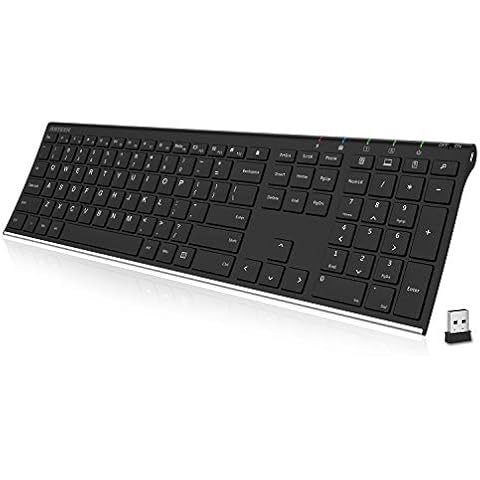
Arteck 2.4G Wireless Keyboard Stainless Steel Ultra Slim Full Size Keyboard with Numeric Keypad for Computer/Desktop/PC/Laptop/Surface/Smart TV and Windows 10/8/ 7 Built in Rechargeable Battery

The Arteck Wireless Keyboard is a full-size keyboard with a numeric keypad that is perfect for desktops, laptops, and smart TVs. It has an easy setup; just plug in the nano USB receiver and start typing. The stainless steel material makes it durable, and the low-profile keys provide a comfortable typing experience. It has an industry-high capacity rechargeable lithium battery that lasts for 6 months with a single charge. The keyboard is ultra-thin and lightweight, making it easy to carry around. Its compact size provides full-size keys, arrow keys, number pad, and shortcuts for comfortable typing.

What We Like
Long battery life
Lightweight and sturdy
Low-profile quiet keys
Easy wireless connection
Great value price
What We Don't Like
Not spillproof
Short charging cable

Logitech Pebble Keys 2 K380s

920-011775
Graphite
One Size
Logitech Pebble Keys 2 K380s Cover
Logitech Pebble Keys 2 K380s, Multi-Device Bluetooth Wireless Keyboard with Customizable Shortcuts, Slim and Portable, Easy-Switch for Windows, macOS, iPadOS, Android, Chrome OS - Tonal Graphite

The Logitech Pebble Keyboard is a versatile wireless keyboard that allows you to seamlessly switch between up to 3 devices with Bluetooth connectivity. With latest features like Emoji menu, dictation, and screenshot shortcuts, you can save time and increase productivity. The 36-month battery life ensures worry-free usage, and the scooped round keys provide a comfortable typing experience similar to a laptop. Additionally, the Logi Options+ support allows for personalized shortcuts, making typing effortless.

What We Like
Compact and lightweight design
Quiet and comfortable typing
Seamless Bluetooth connectivity
Multi-device support
Long battery life
What We Don't Like
Minor language switching issue
Slightly less tactile than traditional keyboards
#TOP 3

Logitech Signature Slim Solar+ Keyboard K980

920-013755
Graphite
Logitech Signature Slim Solar+ Keyboard K980 Cover
Logitech Signature Slim Solar+ Wireless Bluetooth Keyboard K980, Solar and Artificial Light Powered, Up to 10 Years Battery Life, Customizable Keys - Graphite

The Logitech Solar+ Keyboard keeps you typing smoothly without interruption, thanks to its ability to charge using both natural sunlight and artificial light. This means you won't have to worry about your keyboard dying, even on gloomy days. It features Logi LightCharge technology, which combines a light-absorbing strip with a long-lasting, energy-efficient battery, ensuring your keyboard stays powered up. With no cables needed, you can start working right away without any setup hassle. Plus, it’s built to be durable, lasting up to 10 million keystrokes and with a battery life that can stretch up to 10 years. This makes the Logitech Solar+ Keyboard a reliable choice for everyday use.

What We Like
Quiet, comfortable typing experience
Seamless multi-device switching
Premium build quality
Long battery life
Easy Bluetooth setup
What We Don't Like
Slight key click for some users
No backlighting feature
#TOP 4

Microsoft Surface Pro Keyboard for Pro Copilot+ (11th Gen)

8XA-00168
Black
Microsoft Surface Pro Keyboard for Pro Copilot+ (11th Gen) Cover
Microsoft Surface Pro Keyboard for Surface Pro Copilot+ (11th Edition), Pro 9 and 8 with Pen Storage, Alcantara Material, Black

The Microsoft Surface Pro Copilot+ Keyboard is designed to boost your productivity with a dedicated Copilot key that gives you quick access to helpful tools and features. This keyboard also includes convenient new keys for muting your microphone and taking quick screenshots, making it easier to manage calls and capture content on the fly. You’ll enjoy a full mechanical keyboard experience with backlit keys, allowing for comfortable typing even in low light. Plus, the large trackpad offers precise control for smooth navigation. Altogether, this keyboard makes working on your Surface Pro feel effortless and efficient.

What We Like
Comfortable typing experience
Responsive and quiet keys
Secure magnetic pen storage
Stylish color options
High build quality
What We Don't Like
Occasional connectivity issues
Durability could be improved
#TOP 5

Logitech K585 Multi-Device Slim Wireless Keyboard

920-011479
Graphite
Logitech K585 Multi-Device Slim Wireless Keyboard Cover
Logitech K580 Multi-Device Slim Wireless Keyboard, Built-in Cradle for Device; for Laptop, Tablet, Desktop, Smartphone, Win/Mac, Bluetooth/Receiver, Compact, Easy Switch, 24 Month Battery - Graphite

The Logitech K585 keyboard has a slim profile and modern minimalist design with an easy switch feature that pairs multiple devices. It has a whisper-quiet typing experience with a number pad and 12 FN keys available for easy access and media shortcuts. The keyboard has a long battery life with an auto-sleep feature and can be used with multiple devices and platforms. Users can customize the keyboard to fit their needs with the Logi Options+ Software.

What We Like
Compact and lightweight design
Quiet and comfortable typing
Easy Bluetooth and USB setup
Device switching capability
Built-in phone/tablet stand
What We Don't Like
No CAPS LOCK indicator
Phone slot sometimes narrow
#TOP 6

Samsers Foldable Bluetooth Keyboard

KT03
Black
BT x1
Samsers Foldable Bluetooth Keyboard Cover
Samsers Foldable Bluetooth Keyboard with Touchpad - Portable Wireless Keyboard with Holder, Rechargeable Full Size Ultra Slim Pocket Folding Keyboards for Android Windows iOS Tablet & Laptop - Black

The Samsers Bluetooth Keyboard is designed for maximum portability and convenience. Its ultra-slim, foldable design means you can easily slip it into your bag or pocket, making it perfect for travel or business trips. The integrated phone stand holder allows you to position your device at an ideal angle for comfortable viewing. With a sensitive touchpad, you can navigate your device effortlessly without needing a mouse. Plus, the built-in rechargeable battery lasts up to 560 hours on standby, ensuring you stay productive wherever you go.

What We Like
Highly portable design
Easy Bluetooth connectivity
Foldable and compact
Lightweight and durable
Works with multiple devices
What We Don't Like
Small touchpad area
Keys may take adjustment
Buying Guide Image

Factors to Consider when Choosing a Slim Keyboard

Design and Size

When looking for a slim keyboard, consider the design and size. Slim keyboards are known for their compact and sleek design, making them suitable for tight spaces or for those who prefer a minimalist setup. Look for keyboards with a low-profile design, slim keys, and a layout that suits your typing style.

Connectivity Options

Consider the connectivity options available with the keyboard. Most slim keyboards offer wireless connectivity via Bluetooth or a USB receiver, providing flexibility and convenience. Some keyboards also offer wired connectivity options for those who prefer a more stable connection.

Key Features

Look for key features that enhance your typing experience. Backlit keys can be useful for typing in low-light conditions, while multimedia keys allow for easy control of media playback. Additionally, some slim keyboards offer ergonomic features, such as adjustable tilt or wrist support, to enhance comfort during long typing sessions.

Compatibility

Ensure that the slim keyboard you choose is compatible with your devices. Check if it works with your operating system, whether it's Windows, Mac, or Linux. Some keyboards may also have specific compatibility with certain devices, such as tablets or smartphones, so consider your specific requirements before making a purchase.

Durability and Build Quality

Consider the durability and build quality of the slim keyboard. Look for keyboards made from high-quality materials that can withstand daily use. Additionally, check for features like spill resistance or dust-proofing, which can help protect the keyboard from accidents and extend its lifespan.

Frequently Asked Questions (FAQs)

1. Is Slim keyboard good?

Yes, slim keyboards are considered good due to their ergonomic design. The low-profile design reduces strain on the wrists, making them more comfortable for long typing or gaming sessions. This can help prevent conditions like carpal tunnel syndrome and wrist pains.

2. Which keyboards are lightweight and smaller in size?

Wireless keyboards are typically lightweight and smaller in size. They often come with a transmitter and transceiver, allowing them to send keystrokes as radio waves to the parent device. This makes them portable and convenient for on-the-go use.

3. What is the most efficient keyboard shape?

While the QWERTY keyboard layout is commonly used, the Dvorak keyboard layout is considered the most efficient for an ergonomic typing experience. Studies have shown that typing on Dvorak keyboards can increase typing speed by more than 60% compared to QWERTY keyboards.

4. What are the disadvantages of the mini keyboard?

One drawback of mini keyboards is that the palms of the hands need to be pointed downwards to operate the keys. This can lead to continuous rotation of the forearms while typing, similar to using a standard keyboard. However, this may not be an issue for everyone.

5. Why do people prefer smaller keyboards?

People prefer smaller keyboards because they offer a more comfortable and ergonomically pleasing position. With a smaller keyboard, your hands are closer together, reducing strain on the shoulders and allowing for a more natural typing position. Additionally, smaller keyboards free up more desk space and provide more options for mouse placement.

6. Why do people use tiny keyboards?

People use tiny keyboards, like mini keyboards, because they offer ergonomic advantages. Smaller equipment is beneficial for those with narrow shoulders as it reduces the need to reach for keys, minimizing strain on the body. This can be particularly important for office ergonomics.

7. Why do people buy small keyboards?

People buy small keyboards, such as compact mechanical keyboards, for various reasons. These keyboards save desk space, promote better ergonomics, and can even provide a competitive advantage in gaming. By eliminating lesser-used keys, they offer a streamlined and efficient typing experience.

8. Why do people like mini keyboards?

People like mini keyboards because they are more adaptable to different workspaces. Their smaller profile makes them suitable for on-the-go use, providing ease of setup and portability. This flexibility is especially beneficial for those who work in various locations.

9. Why do people use mini keyboards?

People use mini keyboards because they offer ergonomic benefits. The reduced width of the keyboard allows for placing the mouse closer to the center of the body, resulting in increased comfort and less muscle activity in the shoulder. This can contribute to a more ergonomic and efficient work experience.

Editor's Notes

During our slim keyboard research, we found 24 slim keyboard products and shortlisted 6 quality products. We collected and analyzed 261,009 customer reviews through our big data system to write the slim keyboards list. We found that most customers choose slim keyboards with an average price of $29.32.

The slim keyboards are available for purchase. We have researched hundreds of brands and picked the top brands of slim keyboards, including Arteck, Logitech, Microsoft, Samsers. The seller of top 1 product has received honest feedback from 451 consumers with an average rating of 4.9.

Written by
Mike Davis Avatar

Mike Davis is a professionally trained electrician with six years of working experience in the electronics industry. He has written an array of web and mobile-based articles for e-magazines and blogs. He loves trying out some novel and popular gadgets and his expertise is in the areas of electronics and computers which is built over many years of working and personal experiences.

Slim Keyboards Comparison Table

#TOP1
#TOP2
#TOP3
#TOP4
#TOP5
#TOP6
Brand Arteck Logitech Logitech Microsoft Logitech Samsers
Compatible Devices Desktop, Laptop, PC Chromebook, Mac, PC Laptop, Personal Computer, Smartphone, Tablet Microsoft Surface Pro Copilot+ PC (11th Edition), Pro 9, Pro 8 Laptop, PC, Smartphone, Tablet Laptop, PC, Smartphone, Tablet
Connectivity Technology USB Wireless Bluetooth Bluetooth, Radio Frequency, Usb Surface Bluetooth, USB Bluetooth
Special Feature Low-Profile Key Lightweight, Portable Hotkeys and Media Keys, Lightweight, Portable, Rechargeable, quiet Portable Bluetooth, Wireless Foldable, Hotkeys and Media Keys, Portable, Rechargeable, Trackpad
Keyboard Description Wireless Wireless - Mechanical Wireless Samsers Foldable Bluetooth Keyboard with Touchpad - Portable wireless keyboard with holder, supports multi-touch, rechargeable, compatible with Android, Windows, and iOS tablets and laptops.
Recommended Uses For Product Everyday Use Business, Education, Everyday Use, Gaming, Personal - Office Office Gaming, Office
Style Modern PC - Direct Keyboard (New) Modern
Color - Graphite Graphite Black Graphite Black
FTB Score
ftb score rating icon 9.8
ftb score rating icon 9.7
ftb score rating icon 9.5
ftb score rating icon 9.3
ftb score rating icon 9.1
ftb score rating icon 8.9
Where to Buy