Best DVORAK Keyboards of 2026

* We independently evaluate all recommended products and services. If you click on links we provide, we may receive compensation.
Dvorak keyboards are an alternative to the traditional QWERTY keyboard layout. Developed in the 1930s by Dr. August Dvorak, the keyboard is designed to increase typing speed and reduce finger fatigue. The layout is based on the frequency of letter usage in the English language, placing the most commonly used letters on the home row for easy access. While not as widely used as the QWERTY layout, many typists swear by the Dvorak keyboard for its efficiency and comfort. Dvorak keyboards are available in both physical and virtual formats for use on desktops and mobile devices.
At a Glance: Our Top Picks
 #TOP 1
 9.9
9.9
 #TOP 2
9.8
#TOP 2
9.8
 #TOP 3
9.6
#TOP 3
9.6
Top 8 DVORAK Keyboards
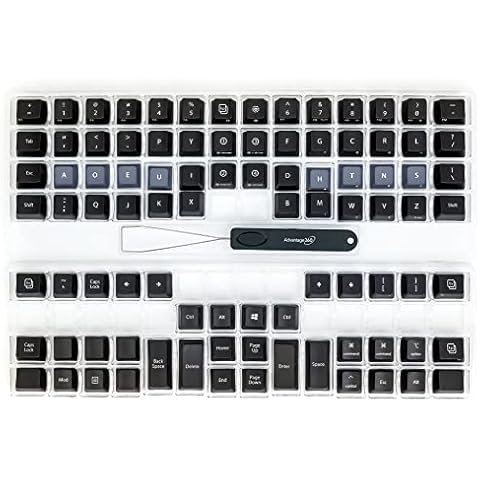
Kinesis Advantage360 Dvorak Keycap Set
The Kinesis Dvorak Keycap Set features 92 keys designed with Dvorak legends, making it perfect for users who prefer this ergonomic layout. Crafted from premium PBT plastic, these keycaps enhance the overall appearance and tactile experience of your keyboard while producing a satisfying sound with each keystroke. The set includes a logo keycap puller, allowing you to easily switch out keycaps without hassle. Additionally, it is compatible with all Kinesis contoured keyboards, ensuring that you can upgrade your typing experience effortlessly.
KINESIS USB-A Freestyle Pro Quiet Ergonomic Split Mechanical Keyboard
The KINESIS USB-A Freestyle Pro Quiet Ergonomic Split Mechanical Keyboard features an award-winning split design that allows for advanced ergonomics for all body types with adjustable split, splay, and tent. It also has Cherry MX "Silent" red mechanical switches for a premium typing feel and performance with less noise. The keyboard has full onboard programmability via the driverless SmartSet Engine, with 9 custom layouts, 8 office hotkeys, on-the-fly macro recording, one-touch key remapping, pre-configured Mac and Dvorak layouts, and the SmartSet App GUI for Windows & Mac. It is also plug-and-play with all major operating systems.
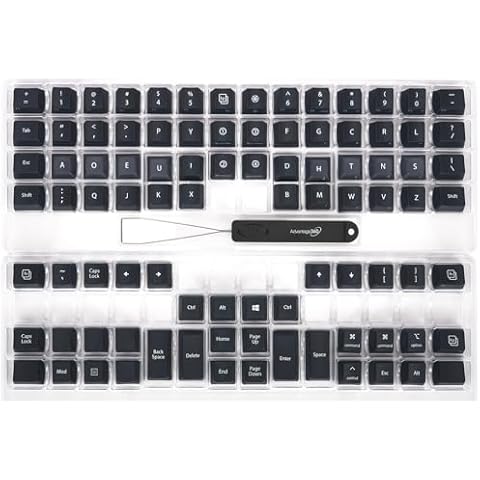
Advantage360 Steel Blue Keycap Set
The KINESIS Keycap Set features a stylish steel blue color and boasts dye-sublimated legends that ensure durability and clarity. With 92 keys designed specifically for Dvorak layouts, this set enhances your typing experience by providing a layout that many find more comfortable. Made from premium PBT plastic, the keycaps not only elevate the aesthetic of your keyboard but also improve the overall feel and sound while typing. Additionally, the included logo keycap puller makes swapping out keys easy and convenient, allowing you to customize your keyboard effortlessly.
BAROCCOMiSTEL MD600 V3 Keyboard

The BAROCCOMiSTEL Keyboard is designed with your comfort in mind. Its ergonomic split layout helps reduce wrist strain, making long typing sessions more enjoyable. With a compact and portable design, you can easily take it with you wherever you go, allowing for convenient use. The keyboard also features customizable macro functions, enabling you to personalize your setup for increased efficiency. Plus, the premium PBT keycaps offer clear legends, ensuring that you can easily identify all functions at a glance, enhancing your overall typing experience.
Dvorak Keyboard Stickers by 4Keyboard

The 4Keyboard Dvorak Stickers are an excellent gift for anyone looking to customize their notebook keyboard. These high-quality stickers ensure your keys are easily identifiable, making typing more efficient. Each sticker is made from durable non-transparent vinyl, meaning they will maintain their appearance over time. With a precise size of 7/16”x1/2”, they fit perfectly on your keys without overwhelming the design. Once applied correctly, you can trust that the letters will remain intact, providing a long-lasting solution for keyboard personalization.
FILCO Majestouch Xacro M3A Mechanical Keyboard

The FILCO Majestouch Xacro offers versatile typing with its customizable layout options, allowing you to switch between QWERTY, DVORAK, COLEMAK, and Mac setups using simple dip switches. This flexibility helps you find the most comfortable and efficient layout for your needs. You can also program the keyboard easily by inputting key patterns directly or using the Filco Assist software on Windows, giving you control over your keyboard’s functions. Additionally, the three dedicated macro keys let you assign complex commands to a single button, saving time during repetitive tasks. With the ability to save up to eight profiles, you can switch between different setups effortlessly depending on your workflow.
4Keyboard Dvorak Non-Transparent Keyboard Stickers

The 4Keyboard Dvorak Stickers offer a great way to customize your notebook or keyboard with ease. These high-quality stickers fit most keyboards perfectly, thanks to their precise size of 7/16” by 1/2” (11mm by 13mm). They are made from durable matte vinyl in black, white, or silver backgrounds, ensuring a professional and sleek look. Once you apply these stickers correctly, the letters will stay put for a long time, so you don’t have to worry about them peeling off. They also make a thoughtful gift for anyone looking to switch to the Dvorak layout or personalize their keyboard.
FILCO Majestouch Xacro M10SP Mechanical Keyboard

The FILCO Xacro M10SP Keyboard is designed with a compact split layout that helps you type more comfortably by reducing strain on your hands. It offers three programmable layers, so you can customize keys to suit different tasks or software easily. You can switch between popular layouts like QWERTY, DVORAK, COLEMAK, or Mac by using simple dip switches, making it versatile for different typing preferences. Additionally, it features 10 dedicated macro keys placed in the center, allowing you to execute commands quickly without complicated key combinations, which can boost your productivity.

Frequently Asked Questions (FAQs)
1. Is Dvorak faster than QWERTY?
While QWERTY has a higher top speed, many top typists believe that Dvorak has the potential to reach the same speed. So, even if Dvorak is not proven to be faster than QWERTY, it is definitely more comfortable to use.
2. What is a Dvorak keyboard used for?
The Dvorak keyboard layout is designed to improve touch-typing, where the user rests their fingers on the home row. It is specifically aimed at enhancing typing speed and efficiency, but it may have less impact on other typing methods like hunt-and-peck.
3. What are the disadvantages of the Dvorak keyboard?
Some drawbacks of the Dvorak keyboard layout include the movement of shortcut keys, less compatibility compared to QWERTY, optimization for English language only, and potential awkwardness with certain Unix commands.
4. How long does it take to learn Dvorak typing?
Research suggests that it takes around 52 hours of practice to match your typing speed with QWERTY when learning Dvorak. There are online Dvorak typing tutors available that can assist you in learning the layout.
5. Why don't we use Dvorak?
Dvorak isn't widely adopted mainly because most computer interfaces and keyboards have been designed around the QWERTY layout since their inception. The layout differences can lead to inefficiencies, such as requiring two hands for certain shortcuts that can be performed with one hand on QWERTY.
6. Can you learn both QWERTY and Dvorak?
It is possible to learn both QWERTY and Dvorak layouts. Although they have significant differences, once you have learned both, you can switch between them on a word-by-word basis.
7. Is Dvorak more accurate?
While there is limited data due to the smaller number of typists using the Dvorak layout, there is some early evidence suggesting that Dvorak typists, as well as Colemak typists, tend to be more accurate. However, it is important to note that the layout's intrinsic speed advantage is not yet fully determined.
During our dvorak keyboard research, we found 24 dvorak keyboard products and shortlisted 8 quality products. We collected and analyzed 5,110 customer reviews through our big data system to write the dvorak keyboards list. We found that most customers choose dvorak keyboards with an average price of $44.59.
The dvorak keyboards are available for purchase. We have researched hundreds of brands and picked the top brands of dvorak keyboards, including KINESIS, BAROCCOMiSTEL, 4Keyboard, FILCO. The seller of top 1 product has received honest feedback from 54 consumers with an average rating of 4.8.
Mike Davis is a professionally trained electrician with six years of working experience in the electronics industry. He has written an array of web and mobile-based articles for e-magazines and blogs. He loves trying out some novel and popular gadgets and his expertise is in the areas of electronics and computers which is built over many years of working and personal experiences.