Best Bluetooth Graphics Tablets of 2026

* We independently evaluate all recommended products and services. If you click on links we provide, we may receive compensation.
Bluetooth graphics tablets are an excellent tool for artists and designers who want to create digital art or work on digital designs. These tablets connect to devices via Bluetooth and can be used to draw, paint, and edit images with precision and accuracy. They come with pressure-sensitive styluses that allow users to create strokes of varying thicknesses and intensities. Bluetooth graphics tablets are also portable and easy to carry around, making them ideal for artists who like to work on-the-go. With their advanced features and user-friendly design, these tablets are a must-have for anyone who wants to take their digital art to the next level.
At a Glance: Our Top Picks
 #TOP 1
 9.9
9.9
 #TOP 2
9.8
#TOP 2
9.8
 #TOP 3
9.6
#TOP 3
9.6
Top 8 Bluetooth Graphics Tablets
Wacom Intuos Medium Bluetooth Tablet
The Wacom Intuos Bluetooth Tablet lets you create with great precision and control, thanks to its battery-free pen technology that feels just like writing on paper. You can use it with any software, making it easy to draw, paint, edit photos and videos, or design right away. With wireless Bluetooth connectivity, you have the freedom to work anywhere—whether at your desk, sofa, classroom, or outdoors. Plus, when you register your tablet, you get access to creative software and online training, helping you improve your skills and make the most of your device.
HUION Note 2-in-1 Digital Notebook
The HUION Note Digital Notebook is a handy tool that lets you write on real paper while instantly creating digital copies of your notes. This means you get the natural feel of pen and paper but with the convenience of saving your work electronically. It also syncs your handwritten notes to your phone or tablet via Bluetooth, so you can view and organize them easily. Plus, you can record audio as you write, helping you capture every detail during meetings or lectures. Sharing your notes is simple, too—you can send your ideas as images, PDFs, or videos with just one click.
Wacom Intuos Pro Medium 2025
The Wacom Intuos Pro offers a highly precise drawing experience thanks to its Pro Pen 3, which supports 8192 pressure levels and tilt sensitivity. This means you can create detailed and smooth strokes that feel natural. The tablet includes 10 customizable ExpressKeys and 2 mechanical dials, allowing you to quickly access shortcuts and adjust settings without interrupting your workflow. Its medium size fits well with modern wide screens, giving you plenty of space to work without taking up your entire desk. Plus, the slim and sturdy design, made with magnesium, provides a comfortable pen-on-paper feel whether you're at your office or working on the go.
XP-PEN Mini Keydial ACK05

The XP-PEN Mini Keydial ACK05 is a wireless shortcut keyboard that offers a more flexible and clean workspace. With three ways to connect - Bluetooth 5.0, Bluetooth dongle, or USB cable - you can enjoy stable and fast transmission. Its compact size and lightweight design make it easy to hold with one hand, and the built-in 1000mAh battery ensures up to 300 hours of continuous working. The keyboard features 10 customizable keys, allowing you to create up to 40 shortcuts for different applications. It also boasts anti-ghosting performance, allowing you to control multiple keys simultaneously. The ergonomic design, with a dot protruding on the middle key, makes it easy to identify and access. The convenient dial control allows you to zoom in/out, rotate the canvas, and adjust the brush size with ease. Compatible with multiple operating systems and software, the XP-PEN Mini Keydial ACK05 is a powerful productivity tool for various purposes.
HUION Kamvas Pro 19 4K Drawing Tablet

The HUION Kamvas Pro 19 offers an impressive 18.4-inch 4K UHD screen that delivers sharp, detailed images with a glass surface designed to feel like real paper, making long drawing sessions more comfortable. Its multi-touch feature lets you use gestures like zooming and scrolling, speeding up your workflow on Windows devices. You’ll enjoy vibrant and accurate colors with wide color gamut coverage, perfect for digital art, design, and video work. The latest PW600 stylus adds precision with high pressure sensitivity, tilt support, and a comfortable grip, helping you create with ease and accuracy every time.
XP-PEN Deco Pro LW 2nd

The XP-PEN Deco Pro is a wireless drawing tablet that offers flexibility and convenience for digital artists and designers. With Bluetooth v5.0, USB wireless receiver, or wire connection options, you can easily connect the tablet to your device. The tablet supports two device pairing simultaneously, allowing for seamless switching between them. It also features a large-capacity lithium battery that provides over 10 hours of battery life. The upgraded X3 Pro stylus with eraser offers 16k levels of pressure sensitivity and a 60-degree tilt function, providing precise and natural drawing and painting experiences. The tablet's elegant design includes a larger work area and a metal back plate for better cooling and improved performance. It also has 10 customizable shortcut keys for efficient workflow. Compatible with various operating systems and drawing software, the XP-PEN Deco Pro is a versatile tool for animation, digital art, and video editing.
UGEE UT2 Android 14 Drawing Tablet 10.36"
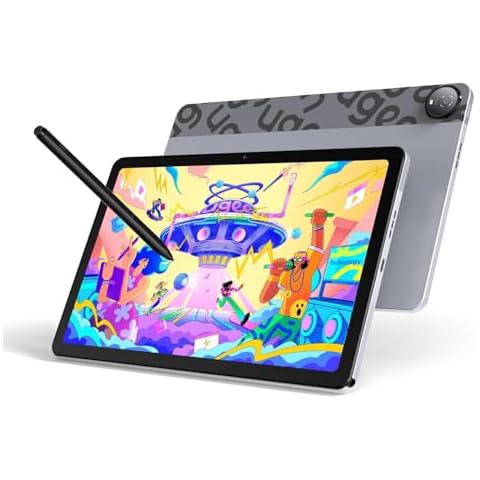
The UGEE UT2 Drawing Tablet lets you create anywhere without needing a computer, thanks to its standalone Android 14 system. You can easily download popular art apps and upload your work with built-in WiFi, perfect for artists who like to work on the go. Its 7000mAh battery supports long drawing sessions of over 9 hours and quickly recharges to keep your creativity flowing without breaks. The tablet’s slim, lightweight design fits easily in your bag, making it convenient for outdoor or remote work. Plus, its 10.36-inch 2K screen shows vibrant, detailed colors with less glare, helping reduce eye strain during long hours of drawing or designing.
XP-Pen Artist Pro 19 Gen2 4K Tablet

The XP-Pen Artist Pro 19 offers an impressive 4K UHD display on an 18.4-inch screen, letting you work with sharp, detailed images that stay clear even when zoomed in. This means your designs will look fantastic whether printed large or viewed on HD screens. Its color accuracy is top-notch, verified by Calman, covering wide color ranges like sRGB and Adobe RGB, so you can trust your colors to be true and vibrant. The tablet’s full-laminated screen reduces glare and mimics the feel of real paper, making long drawing sessions more comfortable. Plus, it comes with two styluses that provide smooth, precise control with high pressure sensitivity and tilt support, giving you flexibility and accuracy in your artwork.

Frequently Asked Questions (FAQs)
1. Are drawing tablets Bluetooth?
Some tablets such as Wacom Intuos connect to the computer using Bluetooth. While other wireless tablets such as a Huion Inspiroy Dial and the Xp Pen Deco 03 connects using a wireless USB receiver. The receiver needs to be connected to the USB port of your tablet.
2. Do Huion tablets have Bluetooth?
HUION Inspiroy Keydial KD200 Bluetooth 5.0-Wireless Graphics Drawing Tablet with Keyboard Dial 5 Customized Express Keys Battery-Free Stylus PW517 Tilt for PC, Mac, Android, 8.9x5....
3. Does Wacom Intuos have Bluetooth?
Push the Home Button on Intuos Pro tablet once - the blue LED starts blinking. Open the Bluetooth settings in the system control panel. Select “BT Intuos Pro” from list of devices. Hit “Pair”.
During our bluetooth graphics tablet research, we found 24 bluetooth graphics tablet products and shortlisted 8 quality products. We collected and analyzed 210,182 customer reviews through our big data system to write the bluetooth graphics tablets list. We found that most customers choose bluetooth graphics tablets with an average price of $193.73.
The bluetooth graphics tablets are available for purchase. We have researched hundreds of brands and picked the top brands of bluetooth graphics tablets, including Wacom, HUION, XP-Pen, UGEE. The seller of top 1 product has received honest feedback from 384 consumers with an average rating of 4.7.
Mike Davis is a professionally trained electrician with six years of working experience in the electronics industry. He has written an array of web and mobile-based articles for e-magazines and blogs. He loves trying out some novel and popular gadgets and his expertise is in the areas of electronics and computers which is built over many years of working and personal experiences.