Best Fax Modems of 2026

* We independently evaluate all recommended products and services. If you click on links we provide, we may receive compensation.
Fax modems are devices that allow computers to send and receive fax messages over telephone lines. These modems work by converting digital data from the computer into analog signals that can be transmitted over a phone line. They are commonly used in offices and homes that still rely on fax machines for communication, and they can also be used to send and receive faxes via email. Some fax modems also offer additional features such as voice messaging and caller ID. With the rise of digital communication, fax modems may not be as popular as they once were, but they still provide a reliable way to send and receive important documents.
At a Glance: Our Top Picks
 #TOP 1
 9.9
9.9
 #TOP 2
9.8
#TOP 2
9.8
 #TOP 3
9.6
#TOP 3
9.6
Top 4 Fax Modems
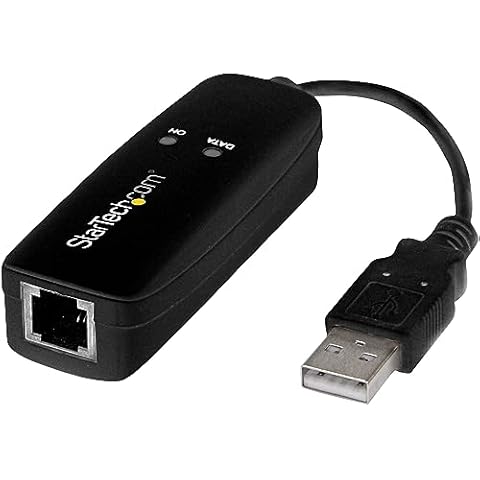
StarTech.com USB 2.0 Fax Modem
The StarTech.com USB 2.0 Fax Modem is an external hardware-driven dial-up modem that provides data and fax support to your computer/laptop via USB. It offers compatibility with various data and fax modes, including V.92, V.90, V.34, V.32bis, V.32, V.22bis, V.22, V.23, V.21 Bell 212A & Bell 103 and V.17, V.29, V.27, V.21 Ch 2, EIA/TIA 578 Class 1 & T.31 Fax Class 1.0 fax modes. The modem's hardware-driven performance ensures it doesn't put any additional load on your CPU, and it is compatible with Windows, macOS, and Windows Server operating systems.
U.S. Robotics 56K USB Controller Dial-Up External Fax Modem
The U.S. Robotics 56K USB Controller Dial-Up External Fax Modem with Voice integrates powerful communications processing functions into the modem itself, ensuring optimal performance without draining processing power. It is compatible with multiple operating systems, including Windows, Mac, and Linux. The device requires only an Intel Pentium III 600 MHz or equivalent, 128 MB RAM, and 5 MB of hard drive space.
56K External Dial Up Fax Data Modem
The 56K External Dial Up Fax Data Modem allows you to connect your laptop or desktop computer to the internet using a dial-up internet service. It is USB-powered and compatible with various Windows operating systems. It has a maximum speed of 56K V9.2/V9.0. With its compact size of 7.5", it is portable and easy to carry around.
USB 56K Voice Fax Data External Modem with Dual Ports

This USB modem provides a 56K data/fax modem with USB interface and is compliant with V.90, and V.42/V.42bis/MNP5 protocols and V.17, V.29, and V.27ter Group 3 fax protocol. It supports Caller ID and distinctive ring detect, Auto format/speed sensing, Data/Fax/Voice call discrimination, and call forward/fallback. The modem has 2 RJ11 ports, Quick Connect, and Modem-on-Hold features. It supports Auto-Dial, Tone and pulse dialing, Auto answer, Auto retrain, and compatible with Windows 98SE/2000/ME/XP/Vista/Win 7.

Frequently Asked Questions (FAQs)
1. What is the difference between a fax machine and a fax modem?
The main difference between a fax machine and a fax modem is that a fax modem requires software to generate the fax transmission from typed-in text or digital files, while a fax machine obtains its source material by scanning the page. Fax modems often produce sharper images compared to fax machines.
2. Are fax modems still used?
Fax modems are still used, especially in situations where there is a dial-up internet connection or a need to replace a standard fax machine. Some businesses that are not connected to high-speed internet still rely on fax modems for their faxing needs.
3. Can you fax with a modem?
Yes, you can fax with a modem. All you need is a telephone cable and modem to connect to your cable modem or all-in-one device. However, if you're looking to fax from a printer without a phone line, that is a different scenario.
4. Can you fax without a modem?
No, you need a dedicated fax modem for sending faxes. The normal internet modem does not work for faxing. Some computers come with a built-in fax modem, but if your computer does not have one, you can install an external fax modem.
5. How can I fax without a phone line or modem?
To fax without a phone line or modem, you have a few options. You can select an internet fax provider and use their service, use an app or fax directly via a web browser, compose a new fax message, upload the documents from your computer, and send the fax. You will receive an email confirmation.
6. Why is fax discontinued?
Fax machines have been discontinued or rendered obsolete due to the development of digital technology and broadband services. Email and document sharing software offer the same or better functionality, leading to a decline in the use of fax machines.
7. What has replaced fax machines?
Fax machines have been replaced by Internet-based technologies such as email and the World Wide Web. These technologies offer more efficient and convenient ways of sharing documents. However, fax machines are still popular in specific industries like medical administration and law enforcement.
8. Is there a way to fax without a landline?
Yes, there are ways to fax without a landline. You can select an internet fax provider and use their service, or use an app or fax directly via a web browser. You can compose a new fax message, upload the document, send the fax, and wait for an email confirmation.
9. Can I fax from my fax machine without a landline?
Yes, you can fax from a fax machine without a landline by using an internet fax solution like MyFax. With this service, you don't need a physical landline as you can easily send a fax without it.
During our fax modem research, we found 24 fax modem products and shortlisted 4 quality products. We collected and analyzed 22,501 customer reviews through our big data system to write the fax modems list. We found that most customers choose fax modems with an average price of $109.91.
The fax modems are available for purchase. We have researched hundreds of brands and picked the top brands of fax modems, including StarTech.com, USRobotics, Miyagle, AGPTEK. The seller of top 1 product has received honest feedback from 384 consumers with an average rating of 4.7.
Mike Davis is a professionally trained electrician with six years of working experience in the electronics industry. He has written an array of web and mobile-based articles for e-magazines and blogs. He loves trying out some novel and popular gadgets and his expertise is in the areas of electronics and computers which is built over many years of working and personal experiences.