Best Access Points for Business of 2026

Mike Davis Avatar
Mike Davis
Last Updated: Jan 11, 2026

* We independently evaluate all recommended products and services. If you click on links we provide, we may receive compensation.

Access points are essential for businesses that require a reliable and high-speed wireless network. These devices act as a central hub for wireless devices to connect to the internet, providing seamless connectivity throughout the workplace. Access points are typically installed in areas where Wi-Fi coverage is weak or non-existent, such as conference rooms or large open spaces. They come in various sizes and specifications, with some models capable of supporting hundreds of users simultaneously. Access points for business are designed with enterprise-grade security features to protect sensitive data and prevent unauthorized access. They are an indispensable tool for modern businesses that rely on technology to stay connected and productive.

At a Glance: Our Top Picks

TP-Link Omada BE11000 WiFi 7 Access Point Cover #TOP 1
TP-Link Omada BE11000 WiFi 7 Access Point
ftb score rating icon 9.8
Ubiquiti UniFi 6+ Access Point Cover #TOP 2
Ubiquiti UniFi 6+ Access Point
ftb score rating icon 9.7
TP-Link EAP615-Wall | Omada Business WiFi 6 AX1800 Access Point Cover #TOP 3
TP-Link EAP615-Wall | Omada Business WiFi 6 AX1800 Access Point
ftb score rating icon 9.5

Top 8 Access Points for Business

#TOP 1

TP-Link Omada BE11000 WiFi 7 Access Point

EAP773
White
TP-Link Omada BE11000 WiFi 7 Access Point Cover
TP-Link Omada WiFi 7 Wireless Access Point | BE11000 Tri-Band | 10G Port | Business Standard | Seamless Roaming | Easy Setup | 5-Year Warranty | Omada Remote Managed(EAP773)

The TP-Link Omada WiFi 7 offers a powerful solution for managing your network with ease. Its integration with the Omada Cloud Management Platform lets you monitor and configure your network remotely, saving you time and effort. With dual-band Wi-Fi 7 technology, you get fast and reliable internet speeds that support multiple devices smoothly. The future-proof 10G port means you can upgrade your internet speed without changing hardware. Plus, the access point includes various networking tools like bandwidth control and security options, giving you full control over your network’s performance and safety.

What We Like
Fast and consistent speeds
Wide coverage range
Easy setup and configuration
PoE functionality
Supports many devices
What We Don't Like
Large physical size
Limited app configuration options

Ubiquiti UniFi 6+ Access Point

U6US
Small
Ubiquiti UniFi 6+ Access Point Cover
Ubiquiti U6+ Dual Band IEEE 802.11 a/b/g/n/ac/ax 3 Gbit/s Wireless Access Point

The Ubiquiti UniFi 6+ is a powerful Access Point that covers 140 m² (1,500 ft²) and connects over 300 devices simultaneously. With WiFi6 technology, you experience faster and more reliable connections. This device uses PoE for easy power supply, making setup hassle-free. The PoE injector, although sold separately, ensures a seamless installation process, eliminating the need for extra power cables. Upgrade to the Ubiquiti UniFi 6+ for efficient and high-performance networking.

What We Like
Easy setup and installation
Strong and stable WiFi coverage
Multiple SSIDs support
Attractive, minimalist hardware design
Local web interface management
What We Don't Like
POE adapter not included
Throughput may not match ISP speeds

TP-Link EAP615-Wall | Omada Business WiFi 6 AX1800 Access Point

EAP615-Wall
White
TP-Link EAP615-Wall | Omada Business WiFi 6 AX1800 Access Point Cover
TP-Link EAP615-Wall | Omada Business WiFi 6 AX1800 in-Wall Wireless Gigabit Access Point | Support OFDMA, MU-MIMO & Beamforming | PoE Powered | Support Omada SDN | Cloud Access & Omada app

The TP-Link EAP615-Wall Access Point is designed to provide ultra-fast Wi-Fi 6 speeds with dual-band Wi-Fi speeds up to 1800 Mbps. It allows for a dedicated Wi-Fi network in each room, making it ideal for office cubicles and hotel rooms. With 4 Gigabit Ethernet Ports and PoE support, deployment is effortless and flexible. The EAP615-Wall is integrated into Omada SDN for multiple control options, and Cloud Access and Omada app allows for centralized cloud management of the network from different sites.

What We Like
Strong wireless coverage
Easy installation and setup
Multiple Gigabit ports
Slim, low-profile design
PoE passthrough support
What We Don't Like
Limited Layer 2 isolation
Roaming between APs not seamless
#TOP 4

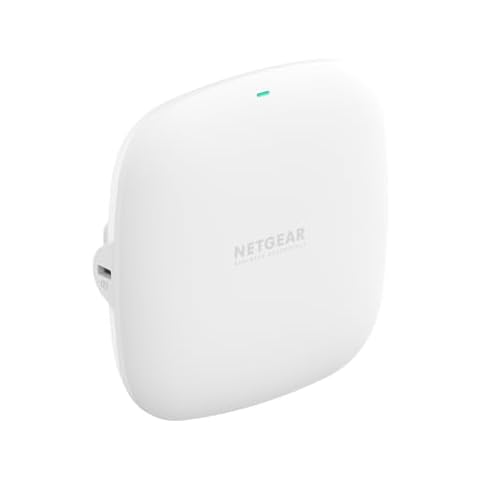
NETGEAR WAX210 Wireless Access Point

WAX210-100NAS
white
small
NETGEAR WAX210 Wireless Access Point Cover
NETGEAR Wireless Access Point (WAX210) - WiFi 6 Dual-Band AX1800 Speed | 1 x 1G Ethernet PoE Port | Up to 128 Devices | 802.11ax | WPA3 | Small Size |Up to 4 SSID Networks, Power Adapter Not Included

The NETGEAR WAX210 Access Point is a compact solution perfect for environments like retail stores or business lobbies where discreet yet robust WiFi is needed. With its dual-band AX1800 speed and MU-MIMO technology, you can support up to 128 devices, ensuring everyone stays connected without lag. The Power over Ethernet (PoE) feature simplifies installation, allowing you to set it up easily without the need for additional power outlets. Additionally, the user-friendly setup wizard makes configuring and managing the network a breeze, so you can focus on your business without technical hassles.

What We Like
Quick and easy setup
Strong WiFi coverage
Great price-to-performance
Compact, low-profile design
PoE support
What We Don't Like
Occasional setup difficulty
Initial password issues
#TOP 5

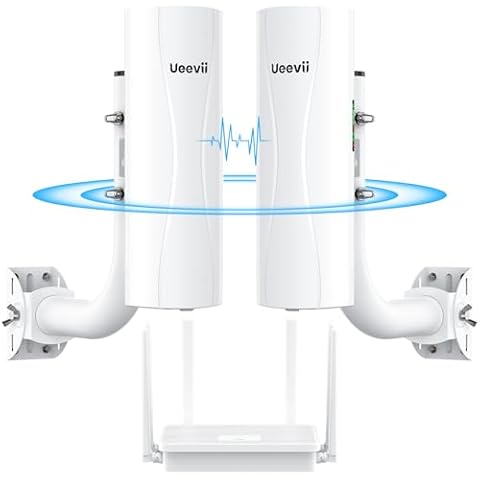
UeeVii CPE688KIT Wireless Bridge System

CPE688KIT (CPE688 Bridge+WiFi6 Router)
Grey
UeeVii CPE688KIT Wireless Bridge System Cover
Point-to-Point Wireless Bridge System CPE688KIT, with WiFi 6 AX3000 Router, Adjustable Installation Brackets, 5KM Range, Dual Gigabit Ports, 24V/48V POE Power Supply – Complete Wireless Bridge Kit

The UeeVii Wireless Bridge Kit offers a complete solution for extending your network over long distances. With two 5.8 GHz wireless bridges, you can connect buildings up to 5 kilometers apart, making it perfect for remote offices or outdoor areas like barns and workshops. Each bridge includes dual Gigabit Ethernet ports, so you can easily connect wired devices that need fast and stable internet. The system uses 48V Power over Ethernet (PoE), which means you only need one cable for both power and data, simplifying installation and reducing clutter. This kit is designed to give you reliable, high-speed connectivity with minimal hassle.

What We Like
Easy installation
Strong, stable connection
Long-range coverage
Works through obstacles
Excellent value
What We Don't Like
Unclear instructions
Occasional defective hardware
#TOP 6

HPE Instant On AP22 WiFi 6 Access Point

Power Adapter Not Included
HPE Instant On AP22 WiFi 6 Access Point Cover
HPE Networking Instant On Access Point AP22 2x2 WiFi 6 Indoor Wireless Access Point | Long Range, Secure, Smart Mesh Support | Power Source Not Included | US Model (R4W01A)

The HPE Instant On AP22 is designed for small and growing businesses, providing fast and reliable WiFi 6 connectivity. Setting it up is simple—you can use the Instant On mobile app or web portal to get it running in minutes without needing any subscription or license. The product comes with everything you need for mounting and connection, including a guide and Ethernet cable. You can power it either through Power over Ethernet (PoE) or a local power adapter, offering flexibility based on your existing setup. Additionally, the Smart Mesh feature lets you easily expand your wireless network without extra cables, making it convenient to cover larger areas.

What We Like
Easy installation and setup
User-friendly mobile app
Strong and reliable Wi-Fi
Good scalability for networks
Stable connections with multiple devices
What We Don't Like
Range could be better
Cloud management required
#TOP 7

Fortinet FortiGate-60F

FORTINET
FG-60F-BDL-950-12
Multicolor
UTP Bundle
Fortinet FortiGate-60F Cover
FortiGate-60F Network Security Appliance Plus 1 Year FortiGuard Unified Threat Protection (UTP) and FortiCare Premium (FG-60F-BDL-950-12)

The Fortinet FortiGate-60F is a powerful WiFi router designed to provide comprehensive protection for your network. With its compact design and lightweight construction, it is easy to install and use. The FortiGate-60F offers a range of features that make it an ideal choice for both small and medium-sized businesses. Firstly, its Unified Threat Protection (UTP) ensures that your network is protected from a wide range of threats, including viruses, malware, and unauthorized access. Secondly, the 24x7 FortiCare and FortiGuard support provide round-the-clock assistance and updates to keep your network secure. Additionally, the FortiGate-60F has a high-performance firewall that allows for efficient traffic management and ensures fast and reliable connectivity. Lastly, its WiFi capabilities enable seamless wireless connectivity for your devices. With the Fortinet FortiGate-60F, you can enjoy peace of mind knowing that your network is secure and protected.

What We Like
Extensive security features
Great performance and reliability
Ideal for small businesses
Easy GUI navigation
Comprehensive subscription services
What We Don't Like
Challenging initial setup
Third-party VPN integration limited
#TOP 8

Ubiquiti Dual Band Wireless Access Point

U6MESHUS
white
6.3" x 1.9"
Ubiquiti Dual Band Wireless Access Point Cover
Ubiquiti Dual Band IEEE 802.11a/b/g 5.30 Gbit/s Wireless Access Point - Indoor/Outdoor

The Ubiquiti Dual Band Access Point helps you create a fast and dependable wireless network for your home or business. It delivers impressive wireless speeds of up to 5.30 Gbit/s, allowing you to enjoy smooth and efficient online communication. Thanks to its support for IEEE 802.11a/b/g technology, you get broad compatibility with various devices. Plus, it offers wireless speeds up to ten times faster than standard wired Ethernet connections, so you can experience a significant boost in network performance. This device is designed to keep your connection strong and reliable, making it easier for you to stay connected without interruptions.

What We Like
Easy setup process
Strong wireless coverage
Customizable software options
Attractive modern design
Reliable connection quality
What We Don't Like
Runs a bit warm
Reduced range through walls
Buying Guide Image

Access Points for Business Buying Guide: What You Need to Know

Introduction

Choosing the right Business Access Points (BAPs) can be a daunting task, especially for small businesses or those new to the market. With so many options available, it's important to take the time to carefully consider your needs and priorities before making a decision. In this article, we'll provide some tips and guidelines to help you select the best BAPs for your business.

Consider Your Budget

One of the first things to consider when choosing BAPs is your budget. BAPs can range in price from a few hundred dollars to several thousand, depending on their features and capabilities. Before you start shopping, it's a good idea to determine how much you can afford to spend on BAPs and then stick to that budget. This will help you narrow down your options and avoid overspending.

Evaluate Your Needs

Another important factor to consider when choosing BAPs is your business's specific needs. Different BAPs are designed to cater to different types of businesses and industries, so it's important to select one that will meet your unique needs. For example, if your business relies heavily on data-intensive tasks, you'll need a BAP with a fast processor and plenty of memory. On the other hand, if you're primarily interested in BAPs for their networking capabilities, you'll want to focus on ones that offer advanced networking features.

Research Your Options

Once you have a good idea of your budget and needs, it's time to start researching your options. The best way to do this is to read reviews and compare the features and specifications of different BAPs. Some good places to start include online retailers, technology blogs, and forums where business owners discuss their experiences with BAPs. This will give you a better understanding of the pros and cons of different BAPs and help you make an informed decision.

Consider Your Future Needs

When choosing BAPs, it's also important to think about your business's future needs. Will your business be growing or expanding in the coming years? If so, you'll want to choose a BAP that can accommodate that growth. This might mean choosing a BAP with a larger processor, more memory, or additional networking capabilities. By considering your future needs, you can ensure that your BAP will be able to support your business as it grows and changes.

Conclusion

Choosing the right BAPs for your business can be a challenging task, but it's an important one. By considering your budget, needs, and future plans, you can select BAPs that will meet your current and future requirements. By taking the time to research your options and compare different BAPs, you can make an informed decision that will help your business thrive.

Frequently Asked Questions (FAQs)

1. What are the three types of access points?

There are three types of access points based on functionalities: standalone access point, multifunction access point, and controlled access point. These types offer different features and capabilities to cater to various business needs.

2. What is the downside of access points?

The downside of access points is the installation process, which may require running cables through walls and ceilings. This can be challenging for some businesses. Additionally, using repeaters to extend coverage can result in slower internet speeds.

3. Can too many access points cause issues?

Yes, having too many access points in a small area can cause interference. The signals from these access points may overlap and interfere with each other, leading to a slower or unstable WiFi connection.

4. Why would you use an access point?

An access point is used in an all-wireless network as a standalone root unit. It acts as a hub, connecting all stations together and increasing the communication range for wireless users. It serves as a central point for wireless communication.

5. Is access point better than Wi-Fi?

An access point is not necessarily better than Wi-Fi, but it can be a valuable addition to a wireless network. Access points can be strategically placed to eliminate dead spots and extend the wireless network's coverage, providing a more reliable and consistent connection.

Editor's Notes

During our access point for business research, we found 24 access point for business products and shortlisted 8 quality products. We collected and analyzed 17,148 customer reviews through our big data system to write the access points for business list. We found that most customers choose access points for business with an average price of $177.28.

The access points for business are available for purchase. We have researched hundreds of brands and picked the top brands of access points for business, including TP-Link, Ubiquiti Networks, NETGEAR, UeeVii, Hewlett Packard Enterprise. The seller of top 1 product has received honest feedback from 384 consumers with an average rating of 4.7.

Written by
Mike Davis Avatar

Mike Davis is a professionally trained electrician with six years of working experience in the electronics industry. He has written an array of web and mobile-based articles for e-magazines and blogs. He loves trying out some novel and popular gadgets and his expertise is in the areas of electronics and computers which is built over many years of working and personal experiences.

Access Points for Business Comparison Table

#TOP1
#TOP2
#TOP3
#TOP4
#TOP5
#TOP6
#TOP7
#TOP8
Brand TP-Link Ubiquiti Networks TP-Link NETGEAR UeeVii Hewlett Packard Enterprise FORTINET Ubiquiti Networks
Model Name Omada WiFi 7 Wireless Access Point U6+ EAP615-Wall WAX210 CPE688KIT Power Adapter Not Included 60F-1YR-UTP -
Special Feature Access Point Mode, Beamforming, Guest Mode, Internet Security, QoS WPS Access Point Mode, WPS Internet Security 2*1000mbps RJ45 Port, Access Point Mode, Complete Point to Point Wireless Bridge Kit, With 2 Adjustable Installation Brackets, With WiFi 6 AX3000 Router Access Point Mode WPS -
Frequency Band Class Tri-Band Dual-Band Dual-Band Dual-Band Dual-Band Dual-Band Single-Band -
Wireless Communication Standard 802.11.be, 802.11ac, 802.11ax, 802.11g, 802.11n 802.11ax 802.11ax 802.11ax 802.11a, 802.11ac, 802.11ax, 802.11g, 802.11n 802.11ax 802.11ac -
Compatible Devices Personal Computer, Security Camera, Smart Television, Smartphone, Tablet Laptop Laptop, PC Gaming Console, Personal Computer, Security Camera, Smart Television, Smartphone Personal Computer Wi-Fi Enabled Laptop -
Recommended Uses For Product Business, Home Business Home Business, Home Business, Gaming, Home Indoor Business -
Connectivity Technology Wi-Fi Wi-Fi Ethernet Ethernet, Wi-Fi 5G, Ethernet, Wi-Fi Wi-Fi 802.11ac, Ethernet -
Color White Information Not Available White white Grey - Multicolor white
Item Weight - 11.8 ounces 7 ounces - 5 pounds - 0.01 ounces 14.1 ounces
FTB Score
ftb score rating icon 9.8
ftb score rating icon 9.7
ftb score rating icon 9.5
ftb score rating icon 9.3
ftb score rating icon 9.2
Where to Buy