Best Mesh Wi-Fi Systems of 2026

Mike Davis Avatar
Mike Davis
Last Updated: Jan 20, 2026

* We independently evaluate all recommended products and services. If you click on links we provide, we may receive compensation.

Mesh Wi-Fi systems are an innovative solution to the problem of spotty Wi-Fi coverage in larger homes or spaces with multiple floors. Unlike traditional Wi-Fi routers, which have limited range and may not reach every area of a building, mesh systems use multiple access points to create a seamless network that can cover even the largest homes. These systems are easy to set up and use, and offer features like parental controls and guest access. They are also highly customizable, allowing users to prioritize certain devices or applications and optimize their network for their specific needs. Overall, mesh Wi-Fi systems are a great choice for anyone looking to improve their home Wi-Fi coverage and performance.

At a Glance: Our Top Picks

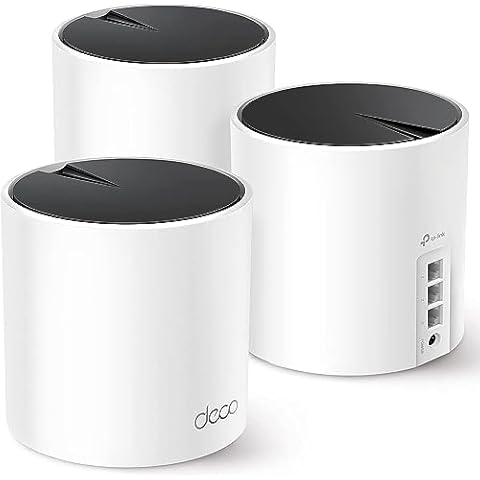
TP-Link Deco AX3000 Wi-Fi 6 Mesh System Cover #TOP 1
TP-Link Deco AX3000 Wi-Fi 6 Mesh System
ftb score rating icon 9.9
eero 7 Dual-Band Mesh Wi-Fi 7 Router 3-Pack Cover #TOP 2
eero 7 Dual-Band Mesh Wi-Fi 7 Router 3-Pack
ftb score rating icon 9.8
TP-Link Deco BE63 Mesh WiFi System Cover #TOP 3
TP-Link Deco BE63 Mesh WiFi System
ftb score rating icon 9.6

Top 10 Mesh Wi-Fi Systems

#TOP 1

TP-Link Deco AX3000 Wi-Fi 6 Mesh System

Deco X55
Black, White
3 Pack
TP-Link Deco AX3000 Wi-Fi 6 Mesh System Cover
TP-Link Deco X55 AX3000 WiFi 6 Mesh System - Covers up to 6500 Sq.Ft, Replaces Wireless Router and Extender, 3 Gigabit Ports per Unit, Supports Ethernet Backhaul, Deco X55(3-Pack)

The TP-Link Deco AX3000 Wi-Fi 6 Mesh System offers a seamless and high-performance internet experience, covering up to 6500 square feet of space. With Wi-Fi 6 Mesh technology, you'll never have to worry about dead zones or buffering. Each Deco X55 unit offers 3 Gigabit Ethernet ports and supports Wired Ethernet Backhaul for better speeds, and is strong enough to connect up to 150 devices. The Deco app helps you set up your network in minutes and TP-Link HomeShield provides premium security services to keep your network safe. The system works with all internet service providers, such as Comcast, AT&T, and Verizon.

What We Like
Easy setup process
Strong whole-home coverage
Stable, fast connection speeds
Handles many devices well
Automatic dual band management
What We Don't Like
Limited compatibility with some TP-Link models
Occasional faulty unit
#TOP 2

eero 7 Dual-Band Mesh Wi-Fi 7 Router 3-Pack

PA10001
WHITE
eero 7 Dual-Band Mesh Wi-Fi 7 Router 3-Pack Cover
Amazon eero 7 dual-band mesh Wi-Fi 7 router (newest model) - Supports internet plans up to 2.5 Gbps, Coverage up to 6,000 sq. ft., 3-pack

The eero Wi-Fi 7 Router offers an affordable way to upgrade your home network with the latest Wi-Fi 7 technology. It helps you eliminate dead zones, so you can enjoy strong and steady internet in every room. With support for internet plans up to 2.5 Gbps and fast wireless speeds, you get smooth streaming and quick downloads. Plus, the three-pack covers up to 6,000 square feet and connects over 120 devices, making it perfect for busy homes with many gadgets. This router makes sure your Wi-Fi is fast, reliable, and ready for the future.

What We Like
Easy setup and installation
Strong WiFi coverage
Dependable performance
Expandable mesh system
Long-term software support
What We Don't Like
Minor setup confusion possible
Limited advanced customization
#TOP 3

TP-Link Deco BE63 Mesh WiFi System

Deco BE63(3-Pack)
White
3 Pack
TP-Link Deco BE63 Mesh WiFi System Cover
TP-Link Deco 7 Pro BE63 Tri-Band WiFi 7 BE10000 Whole Home Mesh System - 6-Stream 10 Gbps, 4x2.5G Ports Wired Backhaul, 4X Smart Internal Antennas, VPN, HomeShield, Free Expert Support (3-Pack)

The TP-Link Mesh WiFi System offers advanced Wi-Fi 7 technology, allowing you to enjoy ultra-fast internet speeds of up to 5188 Mbps on 6GHz and 4324 Mbps on 5GHz. With its extensive coverage of up to 7,600 sq. ft., you can connect over 200 devices without losing performance, making it perfect for busy households. The four 2.5G WAN/LAN ports ensure you have ample wired connections for your devices, while the dual wireless and wired backhaul maximizes speed and coverage. This system is designed to enhance your home connectivity and streamline your online experience.

What We Like
Easy setup and configuration
Excellent whole-home coverage
Strong and stable connection
Customizable device management
Great value for price
What We Don't Like
Large power adapters
Minor USB share naming issue

Amazon eero 6 Wi-Fi 6 Extender

Q010111
WHITE
1 add-on extender
Amazon eero 6 Wi-Fi 6 Extender Cover
Amazon eero 6 mesh wifi add-on extender - Add up to 1,500 sq. ft. of Wi-Fi 6 coverage. Required eero mesh wifi system not included

The Amazon eero 6 Wi-Fi 6 Extender expands your existing eero mesh Wi-Fi system coverage by up to 1,500 sq. ft. It requires an existing eero network and can be set up in minutes using the eero app. With TrueMesh technology, it eliminates dead spots and buffering, ensuring seamless streaming of 4K video, gaming, and video conferencing. Automatic updates keep your network secure and up-to-date.

What We Like
Effortless setup process
Expanded WiFi coverage
Reliable connectivity
Improved signal strength
User-friendly mobile app
What We Don't Like
Occasional connectivity issues
Customer service could improve
#TOP 5

eero Pro 7 tri-band mesh Wi-Fi 7 router 3-pack

ME10001
WHITE
eero Pro 7 tri-band mesh Wi-Fi 7 router 3-pack Cover
Amazon eero Pro 7 tri-band mesh Wi-Fi 7 router (newest model) - Supports internet plans up to 5 Gbps, Coverage up to 6,000 sq. ft., 3-pack

The eero Pro 7 Router offers lightning-fast Wi-Fi that keeps up with your busy home or office life, ensuring smooth streaming and gaming without delays. It effectively removes Wi-Fi dead zones, so you can enjoy a strong connection in every room, even across multiple floors. With support for ultra-fast internet plans up to 5 Gbps and wireless speeds nearing 4 Gbps, it easily handles large data needs for work or entertainment. Plus, the 3-pack setup covers up to 6,000 square feet and supports over 600 devices, so everyone stays connected seamlessly wherever they are.

What We Like
Outstanding speed and coverage
Effortless setup process
Stable and reliable connections
Eliminates Wi-Fi dead zones
Strong performance with multiple devices
What We Don't Like
Higher price point
Minor compatibility quirks
#TOP 6

Amazon eero 6+ mesh Wi-Fi system

R010001
WHITE
Amazon eero 6+ mesh Wi-Fi system Cover
Amazon eero 6+ mesh wifi system - Supports internet plans up to a Gigabit, Coverage up to 4,500 sq. ft., Connect 75+ devices, 3-pack

The Amazon eero 6+ mesh Wi-Fi system delivers fast and reliable gigabit speeds, supports wifi speeds up to a gigabit, and can connect up to 75+ devices. It covers up to 4,500 sq. ft. and comes in a 3-pack. With eero 6+, there is enough bandwidth for the whole family to work, stream and video chat—all at the same time. The eero app guides through setup and allows users to manage their network from anywhere, while automatic updates keep the network safe and secure. The device also includes a built-in smart home hub to connect compatible Thread and Zigbee devices on the network with Alexa, replacing the need to buy separate hubs.

What We Like
Simple app-based setup
Excellent wifi coverage
Fast wifi speeds
Strong security features
Smart home compatibility
What We Don't Like
Higher initial cost
Subscription for advanced features
#TOP 7

NETGEAR Orbi 370 Series WiFi 7 Mesh System

RBE373-100NAS
NETGEAR Orbi 370 Series WiFi 7 Mesh System Cover
NETGEAR Orbi 370 Series Dual-Band WiFi 7 Mesh Network System for Home (RBE373) – Wireless Router + 2 Extenders, Security Features, 5 Gbps, Covers 6,000 sq.ft., 70 Devices, 2.5GB Internet Port, BE5000

The NETGEAR Orbi WiFi 7 offers incredibly fast speeds up to 5 Gbps, making it perfect for homes with many devices connected at once. Thanks to the latest WiFi 7 technology, you get faster internet performance compared to WiFi 6, while still supporting your older gadgets. The system also includes built-in security features that keep your network safe with automatic updates, giving you peace of mind. Plus, its dual-band mesh setup with enhanced backhaul ensures a strong and reliable WiFi signal throughout your entire home, so you can stream, game, and work without interruptions.

What We Like
Excellent whole-house coverage
Strong and stable signal
Dedicated backhaul channel
Easy app-based setup
Attractive, non-intrusive design
What We Don't Like
Pairing takes a few extra minutes
#TOP 8

TP-Link Deco Mesh WiFi System (Deco S4) - 3-pack

Deco S4(3-Pack)
White
3 Pack
TP-Link Deco Mesh WiFi System (Deco S4) - 3-pack Cover
TP-Link Deco S4 Mesh AC1900 WiFi System - Up to 5,500 Sq.ft. Coverage, Replaces WiFi Router and Extender, Gigabit Ports, Works with Alexa, Deco S4(3-Pack)

The TP-Link Deco Mesh WiFi System is designed to provide better WiFi coverage in all directions with faster speeds and strong signals, eliminating dead zones across your home, covering up to 5,500 sq.ft. It creates a single network name and password, allowing seamless roaming throughout the house with parental controls to keep your children safe while online. With advanced mesh technology, it automatically switches devices between Decos for the fastest possible speeds. The setup is easy with the Deco app available on Android or iOS devices and supports wired Ethernet backhaul for better speeds with 2 gigabit Ethernet ports for each Deco S4.

What We Like
Strong and stable signal
Easy installation and setup
Excellent multi-story coverage
Reliable performance after outages
Good value for price
What We Don't Like
Initial setup may require adjustments
Power adapter type may differ
#TOP 9

Google Nest WiFi Pro - 6E - 3 Pack

G6ZUC
Snow
3 Pack
Google Nest WiFi Pro - 6E - 3 Pack Cover
Google Nest WiFi Pro - 6E - Reliable Home Wi-Fi System with Fast Speed and Whole Home Coverage - Mesh Router - 3 Pack - Snow

Google Nest WiFi Pro is a mesh Wi-Fi system that comes in a pack of 3. It uses the latest Wi-Fi 6E technology to provide super-fast speeds and reliable connections for your entire home. With three Wi-Fi routers, it covers up to 6600 square feet of fast, reliable Wi-Fi, and you can customize your setup to create a mesh Wi-Fi system for the coverage you need. The system automatically adjusts your Wi-Fi network's performance and activity, prioritizing video calls and helping websites load quickly. Nest Wifi Pro also has built-in technology to make sure your connection is strong and consistent, even at the edge of your Wi-Fi network's coverage. It monitors itself, diagnoses network issues, and can even fix some common issues on its own. Secure booting and software updates help protect Nest Wifi Pro from running unauthorized software and router hacks. It shows all the devices connected to your Wi-Fi network and allows you to easily pause access for unknown devices that you don't want connecting to your Wi-Fi. You can also create a guest network that uses a different password, so you don't have to share yours.

What We Like
Steady and reliable speeds
Easy installation process
Good coverage for most homes
Ongoing software updates
Attractive design
What We Don't Like
Occasional support difficulties
Limited Ethernet/WAN speed
#TOP 10

eero Pro 6E mesh Wi-Fi System

S010001
WHITE
eero Pro 6E mesh Wi-Fi System Cover
Amazon eero Pro 6E mesh wifi system - Supports internet plans up to 2.5 Gbps, Coverage up to 6,000 sq. ft., Connect 100+ devices, 3-pack

The eero Pro 6E is a mesh Wi-Fi system that offers fast and reliable gigabit+ speeds, coverage up to 6,000 sq. ft., and support for 100+ devices. It's eero's first Wi-Fi 6E system, which means it supports fast speeds and access to the new 6 GHz band when using Wi-Fi 6E devices, resulting in lower latency across your network. The eero Pro 6E is also eero's fastest system yet, supporting network speeds up to 2.3 Gbps, including wired speeds of up to a gigabit and wireless speeds of up to 1.6 Gbps. With its more extensive coverage and support for more devices, the eero Pro 6E is perfect for larger households or small businesses that require a fast and reliable internet connection. Additionally, eero's patented TrueMesh technology intelligently routes traffic to reduce drop-offs and dead spots, ensuring a seamless internet experience. Setting up the eero Pro 6E is a breeze, and the eero app guides you through the process.

What We Like
Easy and fast setup
Wide mesh coverage
Seamless device connectivity
Improved WiFi speed
Great app and support
What We Don't Like
Device identification sometimes unclear
Zigbee compatibility can be finicky
Buying Guide Image

Explore Your Options of Mesh Wi-Fi Systems

Introduction to Mesh Wi-Fi Systems

A mesh Wi-Fi system is a type of wireless network that uses multiple access points to provide coverage throughout your home or office. Unlike traditional Wi-Fi routers, which can only cover a limited area, mesh systems can be easily expanded to cover larger spaces. This makes them a great option for people who need a strong, reliable Wi-Fi signal in every corner of their home or office.

Benefits of Mesh Wi-Fi Systems

One of the main benefits of mesh Wi-Fi systems is their ability to provide consistent, high-speed internet access throughout your home or office. Unlike traditional Wi-Fi routers, which can suffer from signal degradation and dead zones, mesh systems use multiple access points to provide a seamless, uninterrupted signal. This means that you can enjoy fast, reliable internet access in every room of your home or office, without the need for boosters or extenders.

Another benefit of mesh Wi-Fi systems is their ease of setup and use. Unlike traditional Wi-Fi routers, which can be complex and confusing to set up, mesh systems are designed to be user-friendly. Most systems come with a simple, intuitive app that guides you through the setup process, so you can be up and running in no time.

How to Choose the Right Mesh Wi-Fi System

When it comes to choosing a mesh Wi-Fi system, there are a few key factors to consider. First and foremost, you need to think about the size of your home or office, and how much coverage you need. If you have a large space, or if you need to cover multiple floors, you'll need a system with multiple access points to ensure complete coverage. On the other hand, if you have a small space, or if you only need to cover a single floor, you may be able to get away with a single access point.

Another important factor to consider is the speed and performance of the system. Mesh systems are designed to provide fast, reliable internet access, but not all systems are created equal. Before you make a purchase, be sure to read reviews and compare the performance of different systems to find the one that's right for you.

Finally, you'll want to consider the features and capabilities of the mesh system you're considering. Some systems offer advanced features like parental controls and guest networking, while others are more basic. Consider what you need from your Wi-Fi network, and choose a system that meets your needs.

Conclusion

In conclusion, mesh Wi-Fi systems are a great option for people who need a strong, reliable Wi-Fi signal throughout their home or office. They offer consistent, high-speed internet access, and are easy to set up and use. When choosing a mesh system, be sure to consider the size of your space, the speed and performance of the system, and the features and capabilities it offers. With the right mesh Wi-Fi system, you can enjoy fast, reliable internet access in every corner of your home or office.

Frequently Asked Questions (FAQs)

1. Is mesh WiFi really better?

Yes, mesh WiFi systems are better than WiFi extenders. They provide better speeds because the mesh router and satellite nodes work together to create a unified network. This allows for seamless handoff of connections to devices as they move around the home, ensuring faster and more reliable WiFi coverage.

2. What are the disadvantages of WiFi mesh?

There are a few disadvantages of WiFi mesh systems. Firstly, the nodes in a mesh network are complex as they require transmit/receive functionalities and routing algorithms. Secondly, installation and management can be challenging as there is no central place to monitor and control the entire network.

3. Can you use mesh WiFi with existing WiFi?

Yes, you can set up a mesh system with an existing traditional router. However, it is recommended to upgrade to a mesh router for better performance. A mesh router uses multiple connected devices to provide solid WiFi coverage, similar to having multiple traditional routers.

4. Does mesh WiFi replace router?

While a mesh system can replace a traditional router, it doesn't completely replace a router. A mesh system includes a specific mesh router, and it works similarly to a traditional router/modem setup. The mesh router is the central device that coordinates the mesh network.

5. Is it worth upgrading to mesh WiFi?

Upgrading to mesh WiFi offers several benefits, including improved speed and coverage. Traditional routers may struggle with fast speeds and adequate range, resulting in weak signals or dead spots. Mesh WiFi solves these issues by providing faster speeds and better coverage, making it worth the upgrade.

6. Why not use mesh WiFi?

There are a few reasons why mesh WiFi may not be suitable for everyone. In smaller homes or buildings, a mesh network may be overkill, as it is designed to cover larger areas. Additionally, setting up and managing a mesh network can be more complex compared to a traditional router setup.

7. Is mesh WiFi affected by walls?

Mesh WiFi signals can penetrate through walls, but the thickness of the walls can impact the signal strength. While mesh WiFi is a solution for improving WiFi coverage, it still operates on a wireless signal, which can be affected by interferences.

8. How do I add mesh WiFi to my existing router?

To add mesh WiFi to your existing router, you can follow these steps: 1. Put your router/modem into bridge mode via its management portal. 2. Connect the root of your mesh network to the router and set it up using the mesh management app. 3. Set up your other mesh nodes with the app and unify the SSIDs they broadcast (this may be done automatically).

Editor's Notes

During our mesh wi-fi system research, we found 24 mesh wi-fi system products and shortlisted 10 quality products. We collected and analyzed 470,637 customer reviews through our big data system to write the mesh wi-fi systems list. We found that most customers choose mesh wi-fi systems with an average price of $381.66.

The mesh wi-fi systems are available for purchase. We have researched hundreds of brands and picked the top brands of mesh wi-fi systems, including TP-Link, eero, NETGEAR, Google. The seller of top 1 product has received honest feedback from 384 consumers with an average rating of 4.7.

Written by
Mike Davis Avatar

Mike Davis is a professionally trained electrician with six years of working experience in the electronics industry. He has written an array of web and mobile-based articles for e-magazines and blogs. He loves trying out some novel and popular gadgets and his expertise is in the areas of electronics and computers which is built over many years of working and personal experiences.

Mesh Wi-Fi Systems Comparison Table

#TOP1
#TOP2
#TOP3
#TOP4
#TOP5
#TOP6
#TOP7
#TOP8
#TOP9
#TOP10
Brand TP-Link eero TP-Link eero eero eero NETGEAR TP-Link Google eero
Item Weight 5.48 pounds - 4.98 pounds - - - 4.62 pounds 4.2 pounds 0.634 ounces -
Model Name Deco X55(3-Pack) - WiFi 7 Mesh System - - - RBE373 Deco S4(3-Pack) Nest Wifi Pro -
Special Feature Guest Mode - Access Point Mode, Guest Mode, QoS, Remote Access, WPS - - - Multi-Gig Ethernet Access Point Mode Access Point Mode, Guest Mode, Internet Security, LED Indicator, Parental Control, WPS -
Frequency Band Class Dual-Band - Tri-Band - - - Dual-Band Dual-Band Tri-Band -
Wireless Communication Standard 802.11ac, 802.11ax, 802.11b, 802.11g, 802.11n - 802.11.be, 802.11ac, 802.11ax, 802.11g, 802.11n - - - 802.11.be 802.11ac 802.11ax -
Compatible Devices Smartphone, Personal Computer, Security Camera, Smart Television, Tablet, Printer, Gaming Console - Smartphone - - - Gaming Console, Personal Computer, Printer, Security Camera All WiFi Enabled devices Works with devices you have today (laptops, phones, etc.), it also has the tech to make the most out of the next generation of phones, laptops, and more -
Recommended Uses For Product Home - Gaming, Home - - - Business, Home Home Gaming, Home -
Connectivity Technology Ethernet, Wi-Fi - Wi-Fi - - - Ethernet, Wi-Fi Ethernet, Wi-Fi Wi-Fi -
FTB Score
ftb score rating icon 9.9
ftb score rating icon 9.8
ftb score rating icon 9.6
ftb score rating icon 9.5
ftb score rating icon 9.3
ftb score rating icon 9.1
ftb score rating icon 9.0
ftb score rating icon 8.9
ftb score rating icon 8.8
ftb score rating icon 8.6
Where to Buy