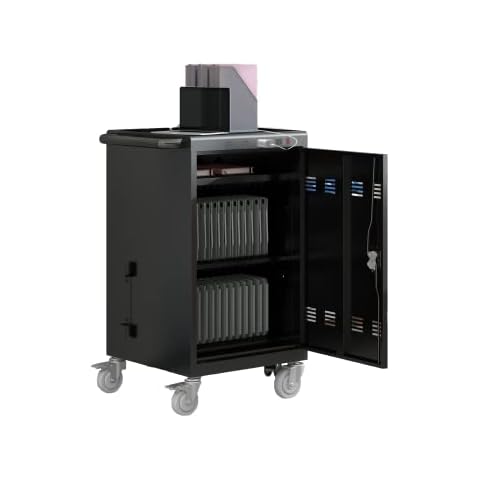
Best Laptop Charging Carts of 2026

Rebecca Cantu Avatar
Rebecca Cantu
Last Updated: Jan 10, 2026

* We independently evaluate all recommended products and services. If you click on links we provide, we may receive compensation.

Laptop charging carts are an essential tool for modern classrooms and offices. These carts allow for the secure storage and charging of multiple laptops, making it easy to keep devices organized and ready for use. With their durable construction and locking mechanisms, laptop charging carts provide peace of mind for administrators and teachers alike. They also allow for easy mobility, so laptops can be moved from room to room as needed. Whether you're looking to outfit a school or a workplace, a laptop charging cart is a smart investment for any organization that relies on technology.

At a Glance: Our Top Picks

VEVOR 16-Slot Locking Charging Station Cover #TOP 1
VEVOR 16-Slot Locking Charging Station
ftb score rating icon 9.8
POCHAR C30A-H Charging Cart Cover #TOP 2
POCHAR C30A-H Charging Cart
ftb score rating icon 9.7
VEVOR 32-Device Mobile Charging Cart Cover #TOP 3
VEVOR 32-Device Mobile Charging Cart
ftb score rating icon 9.5

Top 10 Laptop Charging Carts

#TOP 1

VEVOR 16-Slot Locking Charging Station

SCC-16P
Black
16 Device
VEVOR 16-Slot Locking Charging Station Cover
VEVOR 16 Device Charging Station with Lock & Key, Mobile Charging Cart for Chromebook, iPads, Tablet and Laptop, Up to 15.6 in Screen Size, Office and Classroom Locking Charging Station

The VEVOR 16-Slot Charging Cart is designed to help you organize and charge up to 16 laptops or tablets with screens up to 15.6 inches. It keeps your devices safe with built-in surge protection, so you don’t have to worry about electrical damage. Its ventilated design prevents overheating, ensuring your devices stay cool during charging. Setting it up is simple since it comes with a built-in power strip and cable management system that keeps cords tidy and untangled. Plus, the sturdy wheels make it easy to move the cart wherever you need it, and the locking casters keep it secure when stationary.

What We Like
16 device slots
Built-in surge protection
Efficient cable management
Ventilated for heat dissipation
Mobile with locking wheels
#TOP 2

POCHAR C30A-H Charging Cart

C30A-H
Black
POCHAR C30A-H Charging Cart Cover
30 Unit Device Charging Station for Chromebook, iPad, 14'' Laptop - Charging Cart with Charger Cable Management, Circuit Breaker, Grounding Protection, Assembly Required

The POCHAR Charging Cart is designed to securely store and charge up to 30 devices, including laptops and tablets. With its built-in key locks on both doors, you can rest assured that your devices are safe from unauthorized access. The cart features smooth-rolling wheels, two of which lock, allowing you to move it easily while keeping it stable when stationary. Additionally, the removable front and back doors make organizing cables and chargers a breeze, eliminating the hassle of accessing your devices. This cart is perfect for schools or offices looking for efficient device management.

What We Like
Stores up to 30 devices
Secure key lock system
Easy mobility with locking wheels
Removable doors for easy access
#TOP 3

VEVOR 32-Device Mobile Charging Cart

SCC-32P
Black
32 Device
VEVOR 32-Device Mobile Charging Cart Cover
VEVOR Charging Cart, 32 Device Mobile Charging Station, Up to 15.6 in Screen Size, Office and Classroom Mobile Charging Cart, for Chromebook, Tablet and Laptop

The VEVOR Charging Cart is designed to help you keep up to 32 laptops or tablets neatly organized, fitting devices up to 15.6 inches. This means you can manage multiple gadgets without clutter. It also protects your devices with built-in surge protection, so you don’t have to worry about power spikes damaging your equipment. The cart’s ventilated panels help keep devices cool by allowing heat to escape, which is important for safe charging. Plus, the integrated power strip and cable organizers make setup quick and keep cables tidy, so you spend less time untangling cords and more time using your devices.

What We Like
32-device capacity
Built-in surge protection
Ventilated panels for cooling
Integrated cable management
Easy plug-and-play setup
#TOP 4

Metateel 30-Device Laptop Charging Cart

M-C30A-H
Black
Metateel 30-Device Laptop Charging Cart Cover
Metateel Laptop Charging Cart,30 Charging Station for Chromebook and iPad - Black Computer Charging Cart with Cable Management & Charger Organization for School Classroom & Office, Assembly Required

The Metateel Charging Cart offers a practical solution for managing up to 30 devices, including Chromebooks, laptops, and tablets up to 14 inches and 1.3 inches thick. This makes it perfect for classrooms or offices where multiple devices need charging and storing in one place. It features secure key locks on both front and back doors, so you can confidently keep your devices safe from unauthorized access. The cart moves easily on swivel wheels, and two wheels lock in place to prevent unwanted rolling, giving you both mobility and stability. Plus, removable front and back doors make it simple to organize cables and chargers, saving you time and hassle.

What We Like
30-device capacity
Secure dual key locks
Swivel casters with brakes
Removable front and back doors
#TOP 5

POCHAR 8-Device Universal Charging Station

Y608A
Gray
8 Tablet/Chromebook
POCHAR 8-Device Universal Charging Station Cover
POCHAR 8-Device Universal Charging Station for Laptops & Chromebooks – Classroom Organization for iPads, Tablets & More, Ideal for Schools & Offices

The POCHAR 8-Device Charger is perfect for managing multiple gadgets at once, allowing you to charge up to eight devices like laptops, Chromebooks, tablets, and iPads all together. Its wide slots fit larger devices up to 15.6 inches, so you won’t have to worry about size limits. This makes it an excellent choice for classrooms or offices where many devices need charging and organizing. Plus, it keeps everything neatly arranged, making it easier for you and others to find and use your devices quickly. Built with sturdy materials, this charger is made to last through daily use in busy environments.

What We Like
Charges up to 8 devices simultaneously
Fits laptops up to 15.6 inches
Organizes devices neatly
Durable, high-quality build
#TOP 6

Learniture Structure Series 12-Device Wall-Mount Charging Cart

LNT-NOR1009BK-SO
Black
Learniture Structure Series 12-Device Wall-Mount Charging Cart Cover
Learniture Structure Series 12-Device Charging Station for Laptops and Tablets, Wall-Mount Lockable Charging Cabinet for 12 Tablets/Chromebooks, Black

The Learniture Structure Series 12-Device Wall-Mount Charging Cart is a great choice for those looking for a secure and organized way to store and charge their laptops, tablets, and Chromebooks. It features large storage space to ensure proper fit for Chromebooks and tablets, a wall-mount option, unique rotated outlet orientation, two grommet holes for cables, and a weight capacity of 65 lbs. Customers have praised its quality and convenience, though some have noted that it may not fit larger Chromebooks and that the cords can be difficult to manage.

What We Like
Large storage space to ensure proper fit for Chromebooks and tablets
Wall-mount option for easy installation
Unique rotated outlet orientation for efficient use of outlets
Two grommet holes for cables to charge devices
High quality and convenient
#TOP 7

MetaTeel 8 Tablet Charging Station Lock Box

Metateel CLB8
Black
MetaTeel 8 Tablet Charging Station Lock Box Cover
Metateel 8 Tablet Charging Station Lock Box - Fits 14" Screen, Steel Case & Lockable Door,2 Keys Included - for Chromebook,ipads,Laptop and Tablets - Ideal for Offices, Classrooms and Hospitals(Black)

The MetaTeel Charging Station is a versatile and secure solution for charging, storing, and transporting up to 8 tablets and electronic devices. With 8 divider slots, it can accommodate devices with screens up to 14 inches, including iPads, notebooks, Chromebooks, and laptops. The lockable door, which comes with 2 keys and a combination lock, ensures complete security in various settings such as classrooms, offices, and hospitals. The ventilated sides allow for constant airflow, preventing overheating for all 8 devices. Additionally, the charging station arrives fully assembled and includes drywall-mounting hardware, making it ready to use right out of the box.

What We Like
Secure and lockable
Ventilated sides prevent overheating
Arrives fully assembled
#TOP 8

VEVOR 16-Device Mobile Charging Cart

SOC-16P
Black
VEVOR 16-Device Mobile Charging Cart Cover
VEVOR Charging Cart, 16 Device Mobile Open Charging Station, Up to 15.6 in Screen Size, Office and Classroom Mobile Charging Cart, for Chromebook, Tablet and Laptop

The VEVOR Mobile Charging Cart is designed to help you keep up to 16 laptops or tablets organized, especially those with screens up to 15.6 inches. It saves you space by neatly storing your devices in one place. The cart also protects your gadgets with built-in surge control, preventing damage from power spikes. Its strong metal frame and ventilated design help keep your devices safe and cool while charging. Setting it up is hassle-free thanks to the built-in power strip and cable organizers, which keep cords tidy and avoid tangles. Plus, its sturdy wheels make moving the cart easy, even when it's full.

What We Like
Space-efficient storage
Built-in surge protection
Durable metal construction
Cable management system
Easy mobility with locking wheels
#TOP 9

POCHAR 30-Unit Laptop Charging Cart

C30F-H
Black
30 Units-Black
POCHAR 30-Unit Laptop Charging Cart Cover
POCHAR 30 Unit Device Laptop Charging Cart for Chromebooks, Tablets, and Laptops for K-12 Education Classrooms, and Libraries, —Open-Back Design, Grounding Protection, Easy Assembly

The POCHAR Charging Cart 30 is designed to store and power up to 30 devices like Chromebooks, tablets, and laptops up to 13.3 inches, making it ideal for classrooms or offices. Its open-back design promotes better airflow, which helps keep your chargers cool and extends their life while making setup and maintenance easier. Safety is a priority with built-in circuit breakers and grounding protection that shield your devices from electrical issues. Plus, the cart's smooth-rolling wheels with locking brakes let you move it easily and keep it stable when needed, giving you convenience and peace of mind.

What We Like
Stores and charges 30 devices
Open-back cooling design
Built-in circuit breaker
Grounding protection
Locking caster wheels

TOUPUWAN 36-Unit Charging Cart

Black
TOUPUWAN 36-Unit Charging Cart Cover
Laptop and Tablet Storage Cart, Mobile Charging Cart and Cabinet for Up to 36 Units, with Charging Port Screen Size Up to 16.3", Fits Chromebook, Tablet, Laptop, Suitable for School, Busines. Upgraded

The TOUPUWAN Charging Cart is designed to accommodate up to 36 laptops or tablets, making it ideal for schools, libraries, and various institutions. It features a user-friendly design with a tall handle and smooth-rolling wheels, allowing you to transport it effortlessly, even when fully loaded. Security is a priority, as the cart includes locks for both front and rear doors, ensuring your devices are safe during transit. Additionally, the built-in cable management system helps keep cords organized, preventing tangles and making it easier for you to maintain a neat workspace.

What We Like
Spacious for 36 devices
Easy mobility
Secure locking mechanism
Cable management system
Durable steel construction
Buying Guide Image

The Complete Guide to Buying Laptop Charging Carts

Introduction

When it comes to keeping up with the demand of technology in the classroom, laptop charging carts are an essential item for any school. With so many different models on the market, it can be difficult to select the best option for your needs. This article will help you understand the features and benefits of laptop charging carts so you can make an informed decision and find the perfect one for your school.

Types of Laptop Charging Carts

When it comes to selecting the right laptop charging cart, the first step is to identify the types of carts available. The most common types of laptop charging carts are open carts, closed carts, and rolling carts.

Open Carts: Open carts are the most basic charging carts and are designed to store and charge laptops in one open area. These carts are ideal for smaller schools or classrooms where the laptops are close to the user and easy to access.

Closed Carts: Closed carts provide secure storage and charging of laptops. These carts have doors or drawers that can be locked to ensure the safety of the laptops. These carts are ideal for larger schools or classrooms where the laptops need to be kept secure and out of view.

Rolling Carts: Rolling carts are the most versatile type of laptop charging cart. These carts can be moved easily from classroom to classroom and are ideal for larger schools or classrooms where the laptops need to be accessible but also secure.

Features of Laptop Charging Carts

When selecting the right laptop charging cart for your school, it is important to consider the features of the cart. The most important features to consider are the number of laptops the cart can store and charge, the size of the cart, the type of charging mechanism, and the security features.

Number of Laptops: The number of laptops the cart can store and charge is the most important feature to consider. Depending on the size of the classroom, you may need to store and charge more than one laptop at a time. It is important to select a cart that can accommodate the number of laptops you need to store and charge.

Size of the Cart: Selecting a cart that is the right size for your classroom is also important. You will want to make sure the cart is large enough to accommodate the number of laptops you need to store and charge, but not so large that it takes up too much space.

Charging Mechanism: Different laptop charging carts come with different charging mechanisms. Some carts come with built-in USB ports, while others come with AC outlets. It is important to select a cart that has the right charging mechanism for your needs.

Security Features: Laptop charging carts should also come with security features to ensure the safety of the laptops. Look for carts that come with a lock and key, or even ones with a combination lock.

Tips for Selecting the Right Laptop Charging Cart

When selecting the right laptop charging cart, there are several tips to keep in mind. First, consider the number of laptops the cart can store and charge and make sure it is large enough to accommodate the number of laptops you need. Second, consider the charging mechanism of the cart and make sure it has the right type of charging ports for your needs. Third, look for carts that come with security features such as locks and keys. Finally, consider the size of the cart and make sure it is not too large for the classroom.

Conclusion

Choosing the right laptop charging cart can be a daunting task. With so many different types and features available, it can be difficult to select the best option for your needs. This article has provided an overview of the types of laptop charging carts and the features to consider when selecting the right one for your school. By taking the time to consider the number of laptops the cart can store, the type of charging mechanism, the security features, and the size of the cart, you can make an informed decision and find the perfect laptop charging cart for your school.

Frequently Asked Questions (FAQs)

1. Can I charge my laptop in a car?

Yes, you can charge your laptop in a car using a car laptop charger. It works by connecting your laptop to the cigarette lighter socket power outlet in your car, similar to a regular laptop charger.

2. What does charging carts do?

Charging carts are designed to store and manage mobile devices, such as laptops, in a workspace. They provide an efficient solution for keeping devices organized and fully charged, ensuring they are always ready for use.

3. How can I charge my laptop without a charger?

If you don't have a laptop charger, you may be able to charge your laptop using a smartphone or tablet with reverse charging capabilities. Some devices, like Samsung smartphones and iPads, can act as USB power banks. Connect your laptop to the tablet's USB-C port or enable reverse charging in settings to give your laptop a quick battery boost.

4. What is the best way to charge a laptop?

The best way to charge a laptop is by connecting the power cable to a mains power wall socket and plugging the other end into the power socket on the laptop. You can continue using your laptop while the battery charges.

5. Can I charge laptop in car with USB port?

Yes, you can charge a laptop in a car using a USB Type-C cable charger. Your laptop needs to have a Type-C port to connect it to the car's charging port. Simply connect one end of the USB-C cable to your laptop and the other end to the car's charging port.

6. Is there a power bank for laptops?

Yes, there are power banks specifically designed for laptops. These power banks, such as the HP USB-C Notebook Power Bank or HP Spectre USB-C Power Pack, can also power smartphones and tablets. They are reliable and durable options for charging laptops on the go.

7. Is it safe to charge a cart overnight?

It is not recommended to charge a cart overnight or leave it unattended. Charging carts should be monitored to prevent any potential issues, such as battery leakage or faulty cables. It is best to follow the manufacturer's guidelines and avoid leaving the cart charging overnight.

8. Should you leave a laptop on charge all the time?

It is best to unplug your laptop charger when not in use. Leaving the laptop plugged in all the time can increase the risk of overcharging or excessive heat exposure, which can potentially damage the laptop. Additionally, it is recommended to avoid leaving the laptop plugged into an outlet while unattended.

9. Is it cheaper to use laptop plugged in or on battery?

Laptops are typically set up to use less energy when running on battery power to maximize battery life. When plugged in, laptops may run at higher speeds and consume more energy. Therefore, it is generally more energy-efficient to use a laptop unplugged, running on battery power, unless the battery is running low and needs charging.

Editor's Notes

During our laptop charging cart research, we found 24 laptop charging cart products and shortlisted 10 quality products. We collected and analyzed 2,720 customer reviews through our big data system to write the laptop charging carts list. We found that most customers choose laptop charging carts with an average price of $295.76.

The laptop charging carts are available for purchase. We have researched hundreds of brands and picked the top brands of laptop charging carts, including VEVOR, POCHAR, Metateel, Learniture, TOUPUWAN. The seller of top 1 product has received honest feedback from 384 consumers with an average rating of 4.7.

Written by
Rebecca Cantu Avatar

Rebecca Cantu grew up in a family-owned retail store for home and kitchen products. She worked online and gave assistance to people to buy ideal products for their sweet home after graduating from Northwestern University with a marketing degree. She has been writing content for online shopping guides since 2011 with her professional knowledge and natural sensitivity of appliances.