Best Internal USB Port Cards of 2026

Mike Davis Avatar
Mike Davis
Last Updated: Jan 16, 2026

* We independently evaluate all recommended products and services. If you click on links we provide, we may receive compensation.

Internal USB port cards are a valuable addition to any computer system. These cards allow users to add additional USB ports to their desktop or server, providing more connectivity options for various devices. They are easy to install and can be used to connect peripherals such as printers, scanners, and external hard drives. Internal USB port cards come in various configurations, including PCI and PCIe, and can support high-speed USB 3.0 or the older USB 2.0. They are an affordable and efficient solution for expanding the USB capabilities of a computer system.

At a Glance: Our Top Picks

ELUTENG USB 3.0 PCI-E Expansion Card Cover #TOP 1
ELUTENG USB 3.0 PCI-E Expansion Card
ftb score rating icon 9.8
StarTech.com 5-Port USB PCIe Card Cover #TOP 2
StarTech.com 5-Port USB PCIe Card
ftb score rating icon 9.7
StarTech.com PCIe USB 3.1 Card Cover #TOP 3
StarTech.com PCIe USB 3.1 Card
ftb score rating icon 9.5

Top 10 Internal USB Port Cards

#TOP 1

ELUTENG USB 3.0 PCI-E Expansion Card

ELUTENG PCIE USB Card
6 USB + 2 Type C
ELUTENG USB 3.0 PCI-E Expansion Card Cover
ELUTENG PCIE USB 3.2 Card 8 Ports PCI Expree to USB C Expansion Card Superspeed 6 USB and 2 Type C PCI-e USB3 Hub Controller Adapter 3 Independent Power Module

The ELUTENG PCIE USB 3.0 Card is an 8-port USB interface that allows for eight devices to be connected simultaneously and is backward compatible with USB 2.0 and 1.1 devices. The product itself can provide up to 5V-9A power output with three independent power supply modules, ensuring stable and reliable use. The main control chip expands eight USB 3.0 ports at the same time with each interface reaching 5Gbps transmission speeds. The card can be easily installed on Windows XP/Vista/2008 Server/7/8/10 with the included driver.

What We Like
Excellent USB stability
High-quality components
No driver needed Windows 10/11
Easy installation
Great value for money
What We Don't Like
Tight fit in some cases
Driver CD less useful

StarTech.com 5-Port USB PCIe Card

PS4C3IA3-USB-C-CARD
Black
StarTech.com 5-Port USB PCIe Card Cover
StarTech.com 5-Port USB PCIe Card, USB 3.2 10Gbps, PCI Express Card with 4X USB-C Ports, 1x USB-A Internal Port

The StarTech USB PCIe Card enhances your desktop or server's USB capabilities by providing four high-speed USB Type-C ports and one internal USB Type-A port. With transfer speeds reaching up to 10Gbps, you can quickly move large files or edit high-resolution media without delays. This card also includes optional power support, ensuring your devices receive enough power even when the motherboard’s supply is limited. It is compatible with various operating systems and hardware, making it a versatile choice for anyone looking to upgrade their USB connectivity.

What We Like
Easy installation
High-speed 10Gbps ports
Compatible with Windows 11
Reliable performance
Multiple device support
What We Don't Like
Occasional driver installation needed
Minimal installation instructions
#TOP 3

StarTech.com PCIe USB 3.1 Card

PEXUSB312C3
0.7"x3.1"
StarTech.com PCIe USB 3.1 Card Cover
StarTech.com 2-Port USB 3.2 Gen 2 PCIe Card, USB-C 10Gbps PCI Express 3.0 x4 Adapter, Data Only, Windows/macOS/Linux, TAA

The StarTech.com PCIe USB 3.1 Card is a versatile dual-profile card that fits into both standard and low-profile systems. It adds two USB 3.1 Gen 2 Type-C (10 Gbps) ports to your PC or older PCIe-equipped desktop computer, with support for data transfer up to 10Gbps. It is compatible with Windows, Linux, and MacOS operating systems, and is backward compatible with USB 3.0 and USB 2.0 devices. It also includes an optional SATA power connector for high power devices.

What We Like
Plug-and-play installation
Reliable power delivery
Works well with VR headsets
Fast data transfer speeds
No additional drivers needed
What We Don't Like
Port placement could be better
Slightly lower speed than onboard ports
#TOP 4

ASUS ThunderboltEX 5 Expansion Card

ThunderboltEX 5
BLACK
ASUS ThunderboltEX 5 Expansion Card Cover
ASUS ThunderboltEX 5 Expansion Card – Dual Thunderbolt™ 5 USB-C Ports, 120Gbps Bandwidth, DisplayPort™ 2.1, PCIe 4.0 x4, USB4®, Compatible for Intel 800 Series Motherboards

The ASUS ThunderboltEX 5 is a powerful expansion card designed to enhance your Intel 800 series motherboard with dual USB-C Thunderbolt 5 ports. It lets you charge devices quickly, delivering up to 130 watts of power in total or 96 watts to a single device, making it perfect for fast charging laptops or phones. You can connect up to five Thunderbolt devices in a series, simplifying your workspace by reducing cable clutter. Plus, with blazing data transfer speeds up to 120 Gbps, you can move large files or stream high-quality video without delays. This card also supports DisplayPort 2.1, enabling excellent video output for high-resolution displays.

What We Like
Thunderbolt 5 support
Fast charging capability
Easy PCIe installation
Compatible with select Intel boards
Good price value
What We Don't Like
Limited motherboard compatibility
Documentation could improve
#TOP 5

SUDEHO MFi Certified 256GB 3-in-1 Flash Drive

Sky Blue
256 GB
SUDEHO MFi Certified 256GB 3-in-1 Flash Drive Cover
MFi Certified 256GB Flash Drive for iPhone, 3 in 1 Type-C USB Memory Stick Thumb Drive for Photos Videos, High Speed External Memory Storage Photo Stick for iPhone iPad Android PC (Sky Blue)

The SUDEHO 3-in-1 Flash Drive is a versatile storage solution that works seamlessly with your iPhone, iPad, Android, and PC. It’s officially MFi certified, meaning it supports most iOS devices running iOS 12.1 or later, and lets you back up your photos and videos easily using the ROSPE app. With options of 256GB or 512GB, you get plenty of space to free up your device without needing internet access. The 3-in-1 design includes Lightning, USB-C, and USB connectors, so transferring files between different devices is simple and quick. Plus, it offers fast transfer speeds up to 40MB/s, helping you move large files efficiently.

What We Like
Multi-device compatibility
Plug-and-play convenience
Fast file transfer speed
Large storage capacity
Compact and portable design
What We Don't Like
May require app for iOS
Not ideal with bulky phone cases

StarTech.com 4 Port USB 3.0 PCIe Card

PEXUSB3S44V
4 Ext Quad Bus
StarTech.com 4 Port USB 3.0 PCIe Card Cover
StarTech.com 4 Port USB 3.0 PCIe Card w/ 4 Dedicated 5Gbps Channels (USB 3.2 Gen 1) - UASP - SATA / LP4 Power - PCI Express Adapter Card (PEXUSB3S44V)

The StarTech.com 4 Port USB 3.0 PCIe Card is a high-performance expansion card that increases the efficiency of your USB 3.0 devices with four dedicated USB 3.0 channels and up to 5 Gbps of bandwidth per channel. It is equipped with a multi-use USB connector, UASP support, and optional LP4 or SATA power connector to power high-powered USB devices. This PCIe to USB adapter card is perfect for connecting additional external hard drives, VR headsets, game controllers, digital equipment and more.

What We Like
Dedicated USB 3.0 controllers
Excellent VR compatibility
Plug-and-play with Windows 10
Improved bandwidth and stability
Low-profile design
What We Don't Like
Tight fit for USB cables
Occasional durability issues
#TOP 7

FANBLACK PCIe to USB 3.2 Gen 2 Card

FANBLACK
FANBLACK-PCIE-USB32-20G-7P
USB 3.2 Gen 2
FANBLACK PCIe to USB 3.2 Gen 2 Card Cover
PCIe to USB 3.2 Gen 2 Card with 20 Gbps Bandwidth 7 USB Ports (4 USB Type-A and 3 Type-C Ports), PCI Express (PCIe) Expansion Card for Desktop PC

The FANBLACK PCIe to USB 3.2 Gen 2 Card is a great way to expand your computer's USB ports. It provides 7 external USB 3.2 Gen 2 Ports (4 USB Type-A and 3 USB Type-C Ports) with a total bandwidth of up to 20Gbps. Compatible with Windows 7/8/10/11 (32/64 bit) and Mac OS 10.8.2 and above, this card is perfect for HP windows 11 desktop, Dell 8950, MacPro 4.1/5.1, and Lenovo P520. Installation is quick and easy, and the card is provided from the motherboard through the PCI Express slot to ensure a stable connection and improve data transmission speed.

What We Like
Plug and play installation
Excellent customer service
Plenty of USB ports
Solid build quality
No external power needed
What We Don't Like
Minor fitment issues in some cases
Driver disc not always helpful
#TOP 8

StarTech.com USB-C PCIe Card

PEXUSB321C
StarTech.com USB-C PCIe Card Cover
StarTech.com 1-Port USB 3.2 Gen 2x2 PCIe Card, USB-C 20Gbps PCI Express 3.0 x4 Adapter, Data Only, Windows/macOS/Linux, TAA

Upgrade your desktop PC with the StarTech USB-C PCIe Card. This expansion card adds one USB-C SuperSpeed 20Gbps port, providing up to 15W (5V @ 3A) to power and charge devices. The card features the ASMedia ASM3242 host controller, using x4 lanes of PCIe 3.0, capable of speeds up to 20Gbps, enabling fast access to high-performance devices like NVMe drives and SSDs. The USB Type-C PCI Express card supports Multiple INs, reducing bandwidth loss when mix speed devices are connected to a Hub. The card also supports UASP, improving performance with storage devices. Compatible with Windows, Linux, and macOS, this add-on card installs in a full or low-profile PCIe 3.0 x4 slot, backward compatible with PCIe 2.0. Works with USB 3.1/3.0/2.0 devices but does not support DP-Alt mode for video over USB-C.

What We Like
Easy installation
Full 20Gbps speed support
Plug and play compatibility
Excellent device compatibility
Improved transfer speeds
What We Don't Like
Possible motherboard compatibility issues
Requires quality USB-C cable
#TOP 9

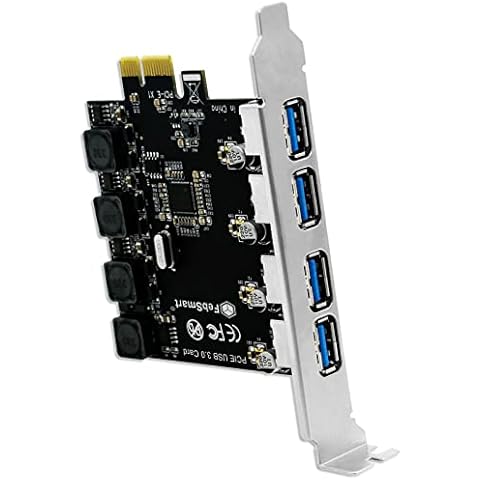
FebSmart USB 3.0 Expansion Card

FS-U4-Pro Black
Matte Black
FebSmart USB 3.0 Expansion Card Cover
FebSmart 4 Ports Superspeed 5Gbps USB 3.0 PCI Express Expansion Card for Windows 11, 10, 8.x, 7, Vista, XP Desktop PCs, Built in Self-Powered Technology, No Need Additional Power Supply (FS-U4-Pro)

FebSmart USB Card is an internal USB 3.0 expansion card that allows users to add four high-speed USB-A ports to their desktop PCs, workstations, and NAS data centers. With a bandwidth of 5Gbps, the card can accommodate high-power consumption USB 3.0 devices such as industrial cameras, VR systems, USB 3.0 NVMe enclosures, live broadcast devices, USB 3.0 SSD/HDD enclosures, USB 3.0 video adapters, and USB 3.0 universal docking stations. The card is equipped with FebSmart Self-Powered Technology, eliminating the need for additional power cables from the desktop PC's power supply unit. It has four electronic safety fuses, four voltage stable capacitors, and four voltage stable inductances to protect users' data and USB 3.0 devices. The card is compatible with various hardware platforms, including AMD, ARM, and Intel, and supports multiple operating systems, including Windows and Linux.

What We Like
Plug and play installation
No extra power required
Fast, stable USB 3.0 ports
Works with multiple devices
Sturdy build quality
What We Don't Like
Occasional crashes under heavy load
Possible radio/TV interference
#TOP 10

StarTech.com 7 Port PCIe USB 3.0 Card

PEXUSB3S7
Metallic
6 Ext | 1 Int
StarTech.com 7 Port PCIe USB 3.0 Card Cover
StarTech.com 7 Port PCI Express USB 3.0 Card - 5Gbps - Standard & Low-Profile - SATA Power - UASP Support - 1 Internal & 6 External USB 3.0 Ports , TAA (PEXUSB3S7)

The StarTech.com 7 Port PCIe USB 3.0 Card is an internal USB port card that adds 7 USB 3.2 Gen 1 ports to any PCIe compatible computer. Its unique dual-profile design fits standard and low-profile computers. With USB 3.2 Gen 1 (5Gbps) and UASP support, you can enjoy fast file transfers. It is backward compatible with USB 2.0 and 1.x devices, and comes with a SATA power connector with up to 900mA per port for high-power USB devices. Native OS support in Windows 8.1 and 8 and Linux kernel 2.6.31 or later makes for easy driver installation.

What We Like
High build quality
Multiple USB 3.0 ports
Easy installation
Reliable performance
Excellent technical support
What We Don't Like
Slightly higher price
No included power cable
Buying Guide Image

What to Look for in Internal USB Port Cards

How to Choose Internal USB Port Cards

Introduction

Adding additional USB ports to your computer can be a convenient way to expand its capabilities and allow for more devices to be connected. One way to do this is by using an internal USB port card, which can be installed inside your computer's case. In this article, we will explain what internal USB port cards are and how to choose the right one for your needs.

What are Internal USB Port Cards?

An internal USB port card is a small expansion card that can be installed inside a computer's case. It typically adds one or more additional USB ports to the computer, allowing for more devices to be connected. These cards are particularly useful for older computers that may not have many built-in USB ports, or for those who need to connect a large number of USB devices and want to avoid using a USB hub.

Internal USB port cards are available in different sizes and with varying numbers of ports. Some cards can be installed in a PCIe slot, while others use a standard PCI slot. There are also internal USB port cards that use the newer USB 3.1 or USB-C standards, which offer faster data transfer speeds and more versatile connectivity options.

How to Choose the Right Internal USB Port Card

When choosing an internal USB port card, there are several factors to consider. Here are some key points to keep in mind:

  1. Compatibility: The first thing to check is whether the internal USB port card is compatible with your computer. Most cards will specify the types of motherboard and CPU they are compatible with, so make sure to check this before purchasing.

  2. Number of ports: The next thing to consider is the number of ports the internal USB port card has. If you only need a few additional USB ports, a card with one or two ports may be sufficient. However, if you need more ports, you may want to choose a card with more ports or consider using a USB hub in addition to the internal USB port card.

  3. Speed: If you plan on transferring large files or using high-speed devices, such as external hard drives or gaming peripherals, you will want to choose a card that supports the faster USB 3.1 or USB-C standards. These standards offer faster data transfer speeds, so your devices will perform better.

  4. Price: Internal USB port cards can range in price from relatively inexpensive to quite expensive, depending on the number of ports and the speed of the card. Consider your budget and the specific needs of your setup when choosing a card.

Conclusion

Internal USB port cards are a convenient way to expand the capabilities of your computer and allow for more devices to be connected. By considering factors such as compatibility, number of ports, speed, and price, you can choose the right internal USB port card for your needs.

Frequently Asked Questions (FAQs)

1. What are internal USB ports for?

Internal USB ports are used to connect the external USB ports on the computer chassis to the motherboard inside the PC. They serve as the endpoint for the connection, allowing devices to be connected via extension cables. Unlike external USB connectors, internal USB headers on the motherboard have different connectors.

2. How do I add more internal USB ports?

There are two main ways to add more internal USB ports. One option is to use a USB hub, which splits the capability of a single USB port into multiple ports. Another option is to add a USB expansion card, which can be installed into an available PCI Express port on the computer. Both methods allow for additional internal USB ports.

3. Do motherboards have internal USB ports?

Most modern motherboards come with onboard USB ports. However, it is also possible to add-on cards with USB ports, especially useful for older machines that may have USB 2.0 ports and want to utilize USB 3.0 devices fully.

4. What does a USB expansion card do?

A USB expansion card allows users to expand the number of USB ports on a computer by utilizing an available PCI Express port. It provides additional USB ports for connecting devices to the computer.

5. What does an internal USB 3.0 connection do?

An internal USB 3.0 connection supports all speeds offered by USB 2.0 and adds SuperSpeed at 5Mb/s. It incorporates both a USB 2.0 hub and a SuperSpeed hub internally. However, for SuperSpeed to be used, all devices and hubs between the host and the device need to be SuperSpeed enabled.

6. What are 3 ways to get more USB ports?

There are three ways to increase the number of available USB ports on your PC. One option is to use USB splitters, which are cables that split into multiple USB ports. Another option is to use USB hubs, which offer additional ports. Powered USB hubs provide more power and can support more devices. Lastly, PCIe expansion cards can be added to the computer to add more USB ports.

7. Why would someone want to add an expansion card?

Expansion cards serve various purposes, such as improving video output with graphics cards, enhancing audio quality with sound cards, enabling wired or wireless connections with network cards, adding extra storage space or speed with storage cards, providing functions like TV tuners or USB, and more. People may want to add an expansion card to enhance the capabilities of their computer.

Editor's Notes

During our internal usb port card research, we found 24 internal usb port card products and shortlisted 10 quality products. We collected and analyzed 28,321 customer reviews through our big data system to write the internal usb port cards list. We found that most customers choose internal usb port cards with an average price of $29.49.

The internal usb port cards are available for purchase. We have researched hundreds of brands and picked the top brands of internal usb port cards, including ELUTENG, StarTech, ASUS, SUDEHO, FANBLACK. The seller of top 1 product has received honest feedback from 417 consumers with an average rating of 4.9.

Written by
Mike Davis Avatar

Mike Davis is a professionally trained electrician with six years of working experience in the electronics industry. He has written an array of web and mobile-based articles for e-magazines and blogs. He loves trying out some novel and popular gadgets and his expertise is in the areas of electronics and computers which is built over many years of working and personal experiences.

Internal USB Port Cards Comparison Table

#TOP1
#TOP2
#TOP3
#TOP4
#TOP5
#TOP6
#TOP7
#TOP8
#TOP9
#TOP10
Brand ELUTENG StarTech StarTech ASUS SUDEHO StarTech FANBLACK StarTech FebSmart StarTech
Hardware Interface PCI PCI Express x4 USB, USB Type C PCI Express x4 Lightning USB 3.0 PCIE x 16, PCIE x 4, PCIE x 8 PCI Express x4 PCIE x 1, USB 3.0 PCIE x 1
Style Classic Music Classic standard - PCI Express Classic Classic FS-U4-Pro PCI Express
Item Weight - 60 Grams 0.05 Kilograms 0.53 Kilograms 1.44 ounces 0.09 Kilograms 0.12 Kilograms 1.28 ounces 3.04 ounces 0.07 Kilograms
FTB Score
ftb score rating icon 9.8
ftb score rating icon 9.7
ftb score rating icon 9.5
ftb score rating icon 9.3
ftb score rating icon 9.1
ftb score rating icon 8.9
Where to Buy