Best External Blu-ray Drives of 2026

Mike Davis Avatar
Mike Davis
Last Updated: Jan 13, 2026

* We independently evaluate all recommended products and services. If you click on links we provide, we may receive compensation.

External Blu-ray drives are a great addition to any computer setup, especially for those who need to read or write to Blu-ray discs. These drives connect to a computer via USB and offer high-speed data transfer rates, allowing users to quickly access and transfer large files. They are compatible with both Mac and Windows operating systems and are easy to use, making them ideal for both personal and professional use. Some external Blu-ray drives also feature additional capabilities, such as DVD and CD read/write functionality or support for 3D Blu-ray discs. Overall, external Blu-ray drives are a reliable and efficient way to expand a computer's capabilities and access high-quality media.

At a Glance: Our Top Picks

ASUS Powerful Blu-ray Drive with 16x Writing Speed Cover #TOP 1
ASUS Powerful Blu-ray Drive with 16x Writing Speed
ftb score rating icon 9.8
Verbatim Ultra HD 4K Blu-ray Writer USB-C Cover #TOP 2
Verbatim Ultra HD 4K Blu-ray Writer USB-C
ftb score rating icon 9.7
OWC Mercury Pro 16X Blu-ray Drive Cover #TOP 3
OWC Mercury Pro 16X Blu-ray Drive
ftb score rating icon 9.5

Top 10 External Blu-ray Drives

ASUS Powerful Blu-ray Drive with 16x Writing Speed

BW-16D1X-U
ASUS Powerful Blu-ray Drive with 16x Writing Speed Cover
ASUS Powerful Blu-ray Drive with 16x Writing Speed and USB 3.0 for Both Mac/PC Optical Drive BW-16D1X-U

ASUS Powerful Blu-ray Drive offers a super-fast 16X Blu-ray writing speed with BDXL support for data storage up to 128 GB. It provides a cloud backup solution for Android devices and is compatible with MacOS and Windows via USB 3.0 connection. The diamond-shaped design gives it a luxury look and clean aesthetics. The Cyber Link Power2Go 8 disc-burning process offers optional encryption functionality for extra private files protection.

What We Like
Fast disc burning
Reliable performance
Compatible with multiple OS
Stable build quality
Easy setup process
What We Don't Like
Outdated bundled software
Bulky and heavy design

Verbatim Ultra HD 4K Blu-ray Writer USB-C

43888
Black
Slim
Verbatim Ultra HD 4K Blu-ray Writer USB-C Cover
Verbatim Ultra HD 4K CD DVD Blu-ray Writer USB 3.2 GEN 1 USB-C Connectivity Slim Brushed Metal Enclosure Compatible with Mac and PC with Free 25GB Verbatim Blu-ray disc

The Verbatim Blu-ray Writer offers a slim and lightweight design that’s perfect if you use a notebook or ultrabook, making it easy to carry around without extra power adapters since it draws power directly from the USB port. With USB 3.2 GEN 1 and a USB-C connection, you get fast writing and reading speeds, which means less waiting when burning or accessing discs. It supports 4K Ultra HD Blu-ray discs and comes with a free 25GB Verbatim Blu-ray disc, ideal for high-quality media storage. Plus, you can store large amounts of data on various disc types, including up to 100GB on BDXL discs, giving you plenty of space for backups or media files.

What We Like
Sturdy build quality
Fast performance
Works with Mac and Windows
Plug-and-play setup
Reliable disc burning
What We Don't Like
Short or loose power cord
Minor tray door issues
#TOP 3

OWC Mercury Pro 16X Blu-ray Drive

OWC
OWCMR3UBDRW16
Aluminum Blu-ray
OWC Mercury Pro 16X Blu-ray Drive Cover
OWC Mercury Pro 16X Blu-ray, 16X DVD, 48X CD Read/Write Solution

The OWC Mercury Pro 16X Blu-ray Drive is an external desktop optical drive that provides reliable long-term storage through its M-DISC compatibility. It is Mac and PC compatible (OS X 10.6 and later; Windows XP and later) and comes with a 0.6 meter USB 3.0 cable and an external power cable. The sleek, durable aluminum chassis is perfect for everyday use, and the device comes with a 1-year OWC Limited Warranty.

What We Like
Robust metal construction
Excellent disc compatibility
Easy firmware downgrade
Reliable separate power supply
Simple setup and portability
What We Don't Like
Power adapter slightly tricky
Minor compatibility issue on Linux
#TOP 4

Archgon Premium Aluminum External USB 3.0 UHD 4K Blu-Ray Writer Super Drive

8541608851
Archgon Premium Aluminum External USB 3.0 UHD 4K Blu-Ray Writer Super Drive Cover
archgon Premium Aluminum External USB 3.0 UHD 4K Blu-Ray Writer Super Drive for PC and Mac

The Archgon Premium Aluminum External USB 3.0 UHD 4K Blu-Ray Writer Super Drive is a high-quality external UHD blu-ray drive that supports M-DISC BD-R and features a CNC aluminum body. It can read UHD, read and write regular Blu-Ray, DVD, and CD with proper software. However, users should be aware that playback of UHD blu-ray on Mac computers is not possible due to the lack of compatible software, while PC users are recommended to use "CyberLink PowerDVD" for reliable playback. Users should also avoid using illegal downgrade firmware or playback software to prevent any damage to the functionality of the UHD drive.

What We Like
Sturdy metal build
4K Blu-ray support
Includes carrying case
Plug-and-play compatibility
Affordable price
What We Don't Like
Can be a bit noisy
Connector could be more secure
#TOP 5

BUFFALO MediaStation External Blu-ray Drive

BUFFALO
BRXL-16U3
Black
BUFFALO MediaStation External Blu-ray Drive Cover
BUFFALO MediaStation Desktop 16x External Blu-ray Writer for PC with USB 3.0. TAA Compliant. Plays and Burns Blu-Rays, DVDs, and CDs.

The BUFFALO MediaStation Desktop Blu-ray Drive is a high-quality external drive that plays and burns Blu-rays, DVDs, and CDs with USB connection. It is compatible with laptops, desktop PCs, and Macs, and comes with fast USB 3.0 technology for high-speed connections. With the ability to write up to 128GB of data, this drive is perfect for high capacity burning. Additionally, it comes with a 2-year manufacturer's warranty and US-based support for added peace of mind. It is TAA compliant and made in Japan, ensuring a quality product.

What We Like
High build quality
Reliable Blu-ray performance
Fast reading and writing speeds
Handles scratched discs well
Wide compatibility (Mac/Windows)
What We Don't Like
Outdated included software
Occasional DVD playback issues
#TOP 6

aelrsoch External Blu-ray Drive USB 3.0 Type-C

black
aelrsoch External Blu-ray Drive USB 3.0 Type-C Cover
aelrsoch External Blu ray Drives Player Read/Write Compatible Bluray Burner USB 3.0 and Type-C DVD Burner blu ray Player for pc, Windows 7-11 & Mac(Black)

The aelrsoch Blu-ray Drive offers fast data transfer with USB 3.0, making it six times quicker than older USB versions, so you can quickly access and manage large files like Blu-rays, DVDs, and CDs. Its compact design and combined USB and Type-C cables make it easy to carry and connect to various devices, perfect for travel or work on the go. This drive works well with Windows, macOS, and Linux, but you’ll need separate software to play or burn Blu-ray discs. It reads and writes multiple disc types, giving you versatile options for storage and media use.

What We Like
Solid build quality
Easy to use
Compact and portable
Reliable USB connectivity
Good value for price
What We Don't Like
Minor compatibility issues with Linux
Occasional shipping defects
#TOP 7

Dainty External Blu-ray Drive USB 3.0/Type-C

Dainty
B0FZK87QBY
black
Dainty External Blu-ray Drive USB 3.0/Type-C Cover
Dainty External Blu-ray Drive Support for Blu-ray DVD/CD Player/Read/Write, USB 3.0 &/Type-C, Support for Blu-ray/DVD/CD, BD Drive, Windows 7-11 & Mac, PC-Compatible, M-DISC(Black)

The Dainty Blu-ray Drive offers fast and flexible connectivity with both USB 3.0 and Type-C ports, allowing you to quickly read and write Blu-ray, DVD, and CD discs. It’s powered mainly through the USB data cable, so you don’t need an extra power source, but it also includes an additional USB power cable for stable use during longer sessions. Plus, it’s designed to work with a wide range of disc types, including large-capacity Blu-ray discs and M-DISCs, making it easy for you to back up or share your data, videos, and photos. This drive supports both Windows and Mac, so you can use it with most computers without hassle.

What We Like
Solid build quality
Easy plug-and-play setup
Reliable disc reading
Supports Blu-ray, DVD, CD
Good value for price
What We Don't Like
Manual English translation choppy
Bundled software issues
#TOP 8

LG Electronics 6X Blu Ray Writer WP50NB40

LG
WP50NB40
Black
LG Electronics 6X Blu Ray Writer WP50NB40 Cover
LG Electronics BDXL Drive - External, Black (WP50NB40)

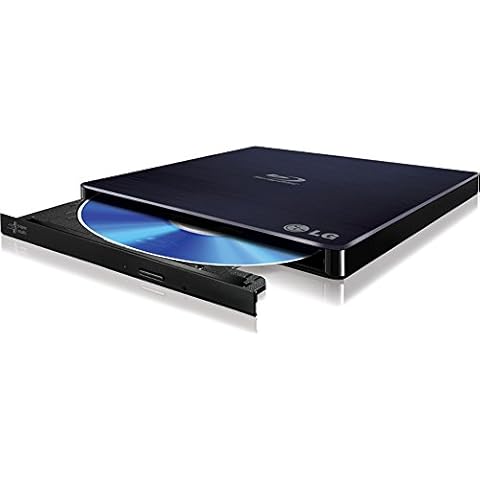
The LG Electronics 6X Blu Ray Writer WP50NB40 is an external slim portable Blu-ray writer that supports M-DISC. With USB 2.0 interface and 4MB buffer memory, it writes CD-R at 24X, CD-RW at 16X, DVDR SL/DL at 8X, DVDRW at 8X/6X, DVD-RAM at 5X, BD-R SL/DL at 6X, BD-RE SL/DL/TL at 2X, and reads CD-R/RW/ROM at 24X, DVD-ROM at 8X, BD-ROM SL/DL at 6X. Its sustained transfer rate for BD-ROM is 26.97 MB/s.

What We Like
Reliable disc reading and writing
Easy setup and compatibility
Supports Blu-ray and DVD
Compact and portable design
Long-term durability
What We Don't Like
4K ripping requires firmware update
Included software not recommended
#TOP 9

Yaeonku Portable External Blu-ray Drive

BD015
Yaeonku Portable External Blu-ray Drive Cover
External Blu Ray Drive, Support 50G Disc Read/Write Bluray Drives, Portable 3D Blu Ray Burner with USB 3.0 and Type-C, Blu Ray Reader Suitable for Windows XP/7/8/10/11 MacOS for Laptop, Desktop, Mac

The Yaeonku Blu-ray Drive is designed for convenience and efficiency. It offers enhanced storage and fast read/write speeds, making it perfect for burning CDs and DVDs. You can easily take it wherever you go thanks to its portable design, which includes a dual-interface for seamless connections to both Type-C and USB 3.0 devices. Plus, the drive provides wide compatibility across various operating systems, ensuring it works with your computer setup. With its advanced error correction and low noise operation, you can enjoy a hassle-free experience while using this drive.

What We Like
Writes to Blu-ray discs
Plays both Blu-ray and DVD
Affordable price point
Works well with powered USB hub
Easy setup with minor tweaks
What We Don't Like
Occasional compatibility with some USB ports
May require powered USB hub
#TOP 10

MthsTec USB 3.0 Type-C External Blu-ray Drive

MC-BW-0001
MthsTec USB 3.0 Type-C External Blu-ray Drive Cover
USB 3.0 and Type-C External Bluray Drive, External Bluray CD DVD Burner and blu ray Player for pc, Blu Ray Disc Reader Compatible with Windows XP/7/8/10, Laptop, Desktop, MacOS for MacBook

The MthsTec Blu-ray Drive is a versatile external device that lets you read and write Blu-ray, CD, and DVD discs quickly, making it easy to handle large files or backups. With fast speeds up to 6x for Blu-ray and 24x for CDs, you can save time when burning or accessing data. It works smoothly with laptops, desktops, and MacBooks across various Windows and Mac operating systems, so you can use it on most devices. The drive also features a stylish light design that adds a cool glow while playing your discs. Plus, it’s simple to use—just plug it in, press eject, and start transferring or watching your favorite content without extra software installation.

What We Like
Fast Blu-ray burning
Cable storage underneath drive
Works with powered USB hub
Quick disc loading
What We Don't Like
Occasional Mac compatibility issues
Flimsy build quality
Buying Guide Image

Finding the Best External Blu-ray Drives

External Blu-ray drives are hard drives capable of reading and writing from Blu-rays, CDs, and DVDs. Our main focus will be on reading Blu-ray since this ability qualifies the drive to read another type of media. Today, you might want to purchase a Blu-ray burner to burn Blu-ray discs to watch a movie on your laptop. This external device will need compatible software on your laptop to play the film. The cost of Blu-ray drives is usually more compared to DVD drives, but this guide will help you make the best buy and get the value of the money spent.

Factors to consider before buying External Blu-ray drives

Model: The external Blu-ray drive model speaks a lot about the design and the innate capacity it has. Look out for brands that have built their reputation. The product should also have a minimum of one year warranty.

Speed: This represents the maximum speed the drive reads the Blu-ray disk. The reading speed of the Blu-ray drive is very important if you will be using it for work.

Cache memory: This represents the memory space in the drive used to store data. You can use this physical media for other purposes aside from playing Blu-ray discs on your computer. They are capable of reading and writing other data on the disc. Hence, the necessity to choose the drive with a large memory size.

Interface type: There are external drive models with different connection ports, either SATA or USB ports. USB External Blu-ray drives with a 3.0 USB port offer faster reading ability compared to those with 2.0 USB.

Cost: The price of Blu-ray drives is quite high, but they are now becoming relatively affordable in recent years. Companies are gradually cutting down the prices. However, to save money by buying inexpensive drives, the needed quality might be lost. The best buy is the best drive with the lowest price. Don't buy poor quality.

Benefits of External Blu-ray drives

  • External Blu-ray drive offers the chance of storing files outside of the computer system and can serve as backup for existing files.
  • It can store up to 128GB on a single disc, making it a versatile storage system.
  • Only a Blu-ray player can read a Blu-ray disc, but a Blu-ray player can read all other types of media.
  • It is detachable and can be used on multiple systems compared to the internal drive installed just on a system.

Frequently Asked Questions (FAQs)

Do I need a 3.0 USB for my Blu-ray drive?

The USB you use with your drive doesn't matter, but to achieve maximum speed, 3.0 USB is advised. However, the 3.0 USB might not work if the drive is of a 2.0 USB port. This is because they are not compatible. Be certain of the version of the USB port of your drive.

Can my Blu-ray drive read a DVD?

Yes, a Blu-ray drive can play both DVDs and CDs.

Frequently Asked Questions (FAQs)

1. Are external Blu Ray drives worth it?

Yes, external Blu-ray drives can be worth it for various situations. They may not be as popular these days, but they can be a useful tool, especially for data backups on a different medium. Blu-ray discs are often used as 'offline' backups, providing an additional layer of protection against events like ransomware.

2. Can external disc drive play Blu-ray?

Yes, there are external disc drives available that can play and burn Blu-ray discs. For example, the BUFFALO MediaStation Desktop Blu-ray Drive is compatible with laptops and desktop PCs, allowing you to play and burn Blu-rays, DVDs, and CDs through a USB connection.

3. How can I play Blu-ray on my computer without a Blu-ray drive?

To play Blu-ray discs on your computer without a Blu-ray drive, you can download a Blu-ray player program like PowerDVD. This software allows you to watch Blu-ray discs on an operating system that doesn't typically support media playback, such as Windows 8.1 or 8.1 Pro.

4. What is the downside of external hard drive?

External hard drives, like any other hardware, can have downsides. They can be susceptible to physical damage, such as fire or water damage, and they can also overheat or malfunction. It's important to ensure proper backup solutions and regularly check the integrity of the stored data to avoid any potential failures.

5. Do external hard drives last longer than flash drives?

In terms of lifespan, external hard drives generally last longer than flash drives. USB flash drives are more durable, but they have a shorter lifespan due to the lack of wear-leveling technology. External hard drives, on the other hand, have a longer lifespan, typically lasting around 3-5 years depending on various factors.

6. How long do external disc drives last?

The average lifespan of an external disc drive, assuming no physical damage occurs, is around 3-5 years. This lifespan can vary depending on factors such as the make, model, and storage conditions. If you use an external disc drive for data backup, it's recommended to consider replacing it every few years to ensure the safety of your data.

7. Will Apple Superdrive play Blu-ray?

No, the Apple Superdrive does not support Blu-ray discs. It is only compatible with DVDs and CDs. To play Blu-ray discs on a Mac, you would need a Blu-ray drive and software specifically designed for Blu-ray playback.

8. Can VLC Media Player play Blu-ray discs?

Yes, the latest version of VLC Media Player supports Blu-ray media playback. You can easily watch Blu-ray videos using VLC by inserting the Blu-ray disc into your Blu-ray drive, launching VLC, selecting Media > Open Disc, choosing the Blu-ray option, and then selecting Play.

9. How do I play Blu-ray files on my PC?

To play Blu-ray files on your PC, you can use VLC Media Player. Insert the Blu-ray disc into your Blu-ray drive, launch VLC, select Media > Open Disc, choose the Blu-ray radial, check the box next to 'no disc menus', ensure your Blu-ray is selected in the disc device field, and then select Play.

Editor's Notes

During our external blu-ray drive research, we found 24 external blu-ray drive products and shortlisted 10 quality products. We collected and analyzed 78,191 customer reviews through our big data system to write the external blu-ray drives list. We found that most customers choose external blu-ray drives with an average price of $88.72.

The external blu-ray drives are available for purchase. We have researched hundreds of brands and picked the top brands of external blu-ray drives, including ASUS, Verbatim, OWC, SEA TECH, BUFFALO. The seller of top 1 product has received honest feedback from 384 consumers with an average rating of 4.7.

Written by
Mike Davis Avatar

Mike Davis is a professionally trained electrician with six years of working experience in the electronics industry. He has written an array of web and mobile-based articles for e-magazines and blogs. He loves trying out some novel and popular gadgets and his expertise is in the areas of electronics and computers which is built over many years of working and personal experiences.

External Blu-ray Drives Comparison Table

#TOP1
#TOP2
#TOP3
#TOP4
#TOP5
#TOP6
#TOP7
#TOP8
#TOP9
#TOP10
Brand ASUS Verbatim OWC SEA TECH BUFFALO aelrsoch Dainty LG Yaeonku MthsTec
Special Feature M DISC support Lightweight, Plug & Play Compatible with M-DISC Blu-Ray Disc BDXL support for writing to high capacity Blu-ray discs., CyberLink Media Suite for playback and burning of Blu-ray discs, DVDs or CDs on the PC., DVD Video Upscaling for near Blu-Ray quality., High-speed USB 3.0 connection., Reads and Writes Blu-ray, DVD, CD. external Compatible bluray drives Plug & Play Blu-Ray Disc Plug & Play Lightweight
Hardware Interface USB USB 3.2 Gen 1 USB 3.0 USB USB, USB 3.0 USB 3.0 USB 3.0, USB Type C USB USB 3.0 Type C USB 3.0 Type C
Optical Storage Read Speed 16x 4x 16X 6X Blu-Ray 12x(BR) / 16x(DVD) / 48x(CD) compatible with BD various (6X), DVD various (8X), CD various (24X)" - 8X DVD-ROM/ 6X BD-ROM/ 24X CD-R/RW/ROM 24X 6x,8x,24x
Optical Storage Write Speed 16x 6x 48x 12x 16x(BR) / 16x(DVD) / 48x(CD) - - 6X BD-R/ 2X BD-RE/ 8X DVD+RW/ 6X DVD-RW/ 5X DVD-RAM/ 24X CD-R/ 16X CD-RW 24x 6x
FTB Score
ftb score rating icon 9.8
ftb score rating icon 9.7
ftb score rating icon 9.5
ftb score rating icon 9.3
ftb score rating icon 9.2
ftb score rating icon 9.1
ftb score rating icon 8.9
Where to Buy